Japan Visit Japan Web
Arrival Card Asia | Visit Japan Web
August 7, 2026
✈️ Before You Go
Before you land, know this: Visit Japan Web isn't a visa—it's a combined immigration and customs declaration for most tourists (visa-free countries still need it). The online form takes about 15 minutes if you have your passport and flight details handy, but the real bottleneck is the QR code—save it as a screenshot, not in your email, because airport Wi-Fi can be spotty. First-timers are shocked that the 'fast track' lane is only for those who completed the form 24+ hours before departure; doing it at the gate often means you're stuck in the regular line anyway. Travelers often find that fill out the customs section for each family member separately, even for kids, and use the same QR code for both immigration and customs—you'll scan it twice, but it's one code. Also, many travelers miss that you can update your return flight info after arrival, so don't stress if your itinerary changes. Keep your QR code saved offline, and you'll breeze through Narita or Haneda in under 20 minutes.
⚠️ Important Notes
Fill Time Window
Complete before arrival. QR code required for both immigration and customs clearance.
Cost
Free
0- • Complete Visit Japan Web online before departure — paper disembarkation cards (ED cards) are still available (handed out on flights and at immigration counters) but digital registration gets you through faster
- • Since Jan 2024, immigration QR and customs QR have been merged into a single code — no need to generate two separate codes
- • Passport info is bound to your Visit Japan Web account — if you renew your passport, you must re-register
- • Screenshot your QR code in advance — airport Wi-Fi may be unreliable. Tax-free QR cannot be screenshotted; open it live in the app
- • Each traveler (including infants) needs their own account. Family members (up to 10, spouse/direct relatives only) can be grouped
- • Complete at least 6 hours before scheduled landing time. We recommend 1-2 days in advance
- • Haneda, Narita T3, Kansai, and Fukuoka airports have Joint Kiosk terminals — scan once for both immigration and customs
- • Visit Japan Web is completely free — any app on App Store/Google Play claiming to be the official app is a scam
- • Official domain moved from vjw.digital.go.jp to services.digital.go.jp/visit-japan-web/ — the old address is dead
- • From Nov 2026, Japan tax-free shopping changes to pay-full-then-refund at airport via J-TaxRefund system
- • If the official site is in a language you don't speak, use your browser's built-in translation — third-party translation extensions may break form validation.
📋 Field Guide
| Field Name | Tips & Notes |
|---|---|
姓 (Surname) / 名 (Given Names) Surname / Given Names | Fill exactly as shown on your passport. Do NOT swap surname and given name. |
护照号码 (Passport Number) Passport Number | Watch out for letter O vs number 0. Passport numbers typically don't contain letters O or I. |
在日住宿地 (Accommodation) Accommodation in Japan | Enter the complete address and postal code of your first night's accommodation. |
航班号 (Flight/Vessel No.) Flight Number | Enter the flight number arriving IN Japan, not your departure flight. |
Step-by-Step Guide
💡 Before You Start
Before you start, prepare every traveller's passport, the arrival flight number, and the full address (with postal code) of your first night's accommodation in Japan. Each person needs their own account — one account can manage up to 10 family members. Complete everything at least 6 hours before your flight's scheduled landing time; 1-2 days ahead is ideal. The service is free and web-based — there is NO official app, so never install any app claiming to be Visit Japan Web. If the site's language is not yours, use the browser's built-in translation rather than third-party translation plugins, which can break form validation.
1Open the Official Visit Japan Web Portal
1fields
Open the Official Visit Japan Web Portal
1fields
The official Visit Japan Web portal of Japan's Digital Agency (services.digital.go.jp/visit-japan-web). The service works in 6 languages (Japanese, English, Korean, Simplified Chinese, Traditional Chinese and more). Click "Start using the service" (利用をはじめる) to open the actual system at vjw.digital.go.jp. The portal also lists important notices — e.g. the immigration and customs QR codes were merged into a single code in January 2024.
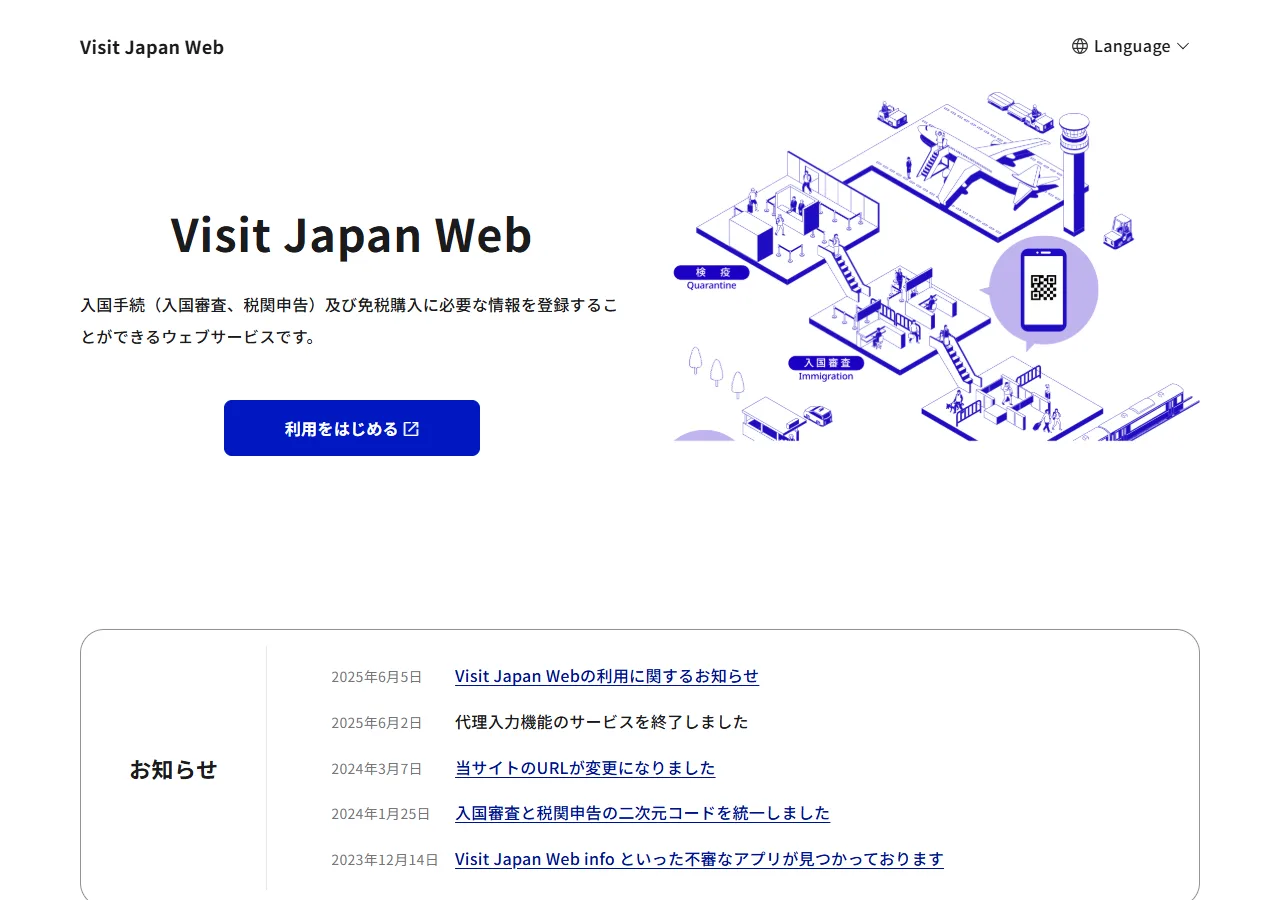
📸 About This Screenshot
This screenshot shows the latest official electronic entry card landing/login page. The step-by-step text guide below is based on the actual form structure, with detailed field instructions and common mistake warnings for your reference.
Start Using the Service
buttonRequiredClick "Start using the service" to open vjw.digital.go.jp, where you create your account. Note the old domain vjw.digital.go.jp is still used for the service itself; the portal address moved to services.digital.go.jp in March 2024 — old bookmarks may fail.
⚠ Common Mistakes
- •Using an old bookmark to the previous portal address
- •Downloading a fake "Visit Japan Web" app — the service has NO official app
2Understand the Procedure Flow
1fields
Understand the Procedure Flow
1fields
The portal's usage-flow guide shows the whole procedure: register an account → register your profile and trip → complete the immigration and customs declarations → show the QR code at the airport. Since January 2024 the immigration and customs codes are a single combined QR code — one scan covers both.
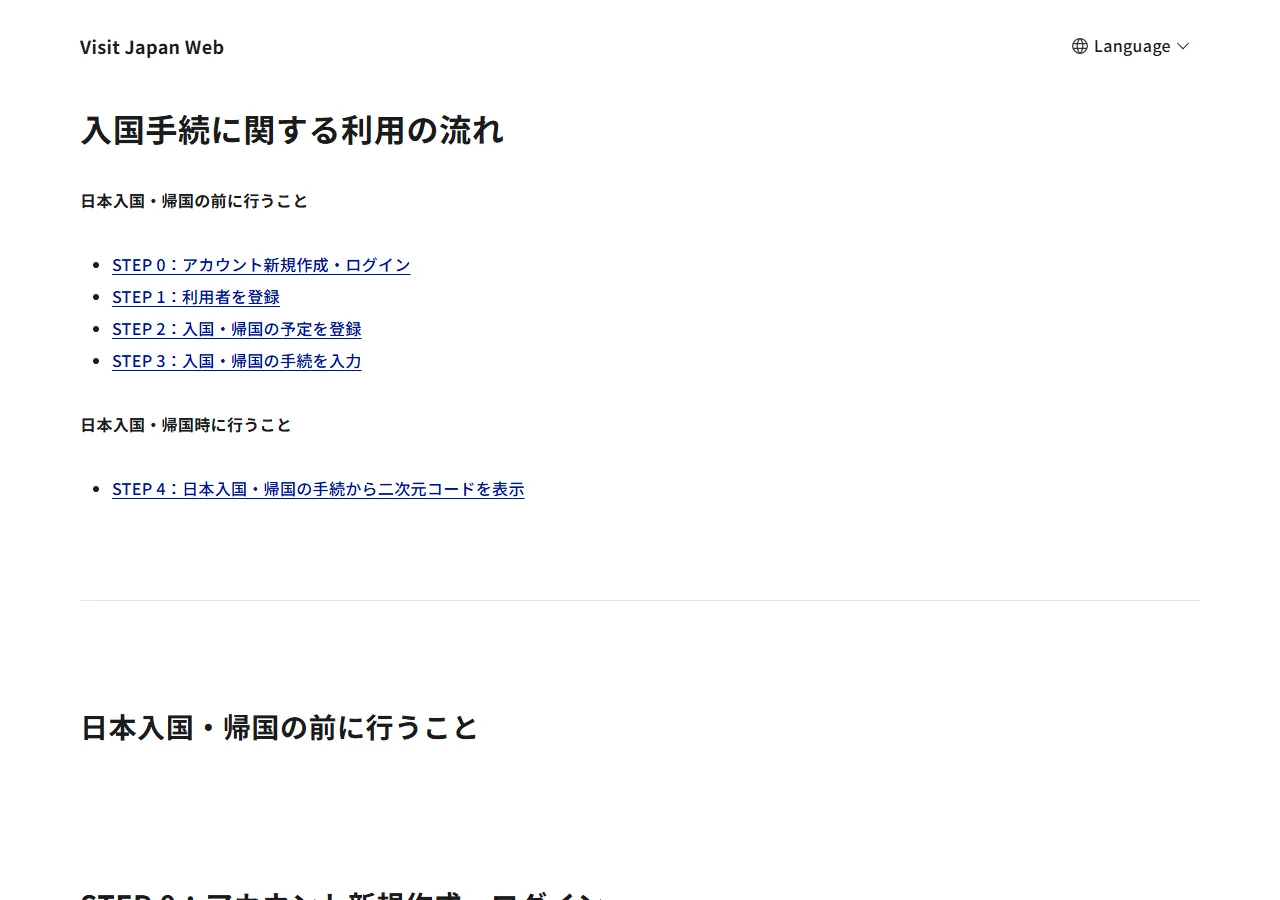
📸 About This Screenshot
This screenshot shows the latest official electronic entry card landing/login page. The step-by-step text guide below is based on the actual form structure, with detailed field instructions and common mistake warnings for your reference.
Procedure Overview
buttonOptionalFamiliarise yourself with the flow before starting. The manual (操作説明書) on the portal contains screenshots of every screen — useful if you get stuck mid-form.
⚠ Common Mistakes
- •Skipping the flow guide and being surprised by the multi-step registration
3Create Your Account (One per Person)
2fields
Create Your Account (One per Person)
2fields
The actual system opens at vjw.digital.go.jp. Everyone needs their own account — including babies and children. One account can register up to 10 accompanying family members (spouse and direct relatives only) so one person can complete the declarations for the whole family. Your passport details are bound to your account; if you renew your passport, you must re-register it.
Account & Passport Binding
textRequiredRegister your passport details exactly as printed. If you renew your passport, re-register the new one in your account before travelling. Surname and given name must not be swapped.
⚠ Common Mistakes
- •Swapping surname and given name
- •Forgetting to re-register after passport renewal
Family Registration
textOptionalAdd up to 10 accompanying family members (spouse and direct relatives) to one account so one person fills in the declarations for everyone.
⚠ Common Mistakes
- •Trying to register friends or distant relatives — only spouse and direct relatives are allowed
4Register Your Trip
2fields
Register Your Trip
2fields
Register your trip: the flight number arriving IN Japan (not your departure flight), and the full address including postal code of your first night's accommodation in Japan.
Flight Number (Arrival)
textRequiredThe flight that lands in Japan. Enter it exactly as on your boarding pass — travellers often enter their departure or connecting flight by mistake.
⚠ Common Mistakes
- •Entering the departure flight instead of the arrival flight
Accommodation in Japan
textRequiredComplete address of your first night's stay, including the postal code (7 digits). The address lookup requires the correct format — copy it from your booking confirmation.
⚠ Common Mistakes
- •Entering only the hotel name without the full address
- •Omitting or mistyping the postal code
5Immigration & Customs Declaration
2fields
Immigration & Customs Declaration
2fields
Answer the immigration and customs questions for each registered traveller. Since January 2024 the two declarations produce ONE combined QR code. Complete everything at least 6 hours before the scheduled landing time of your flight — better still, do it 1-2 days ahead. Japan has fully abolished paper arrival cards.
Declaration Answers
radioRequiredAnswer for each traveller, including children. Declare restricted items and goods exceeding duty-free limits honestly — false declarations face penalties at the airport.
⚠ Common Mistakes
- •Answering 'nothing to declare' without reading the questions
Combined QR Code
buttonRequiredOne QR code now covers both immigration and customs. Screenshot it in advance — airport Wi-Fi can be unreliable. (The tax-free QR code is different: it must be opened live in the app and cannot be screenshotted.)
⚠ Common Mistakes
- •Waiting until arrival to open the QR code, relying on airport Wi-Fi
6At the Airport & Joint Kiosk
1fields
At the Airport & Joint Kiosk
1fields
On arrival, show your QR code at immigration and customs. Haneda, Narita T3, Kansai and Fukuoka airports have Joint Kiosks — a shared self-service terminal where ONE scan completes both immigration and customs at once. The service is completely free: any app in the stores claiming to be official is fake.
Joint Kiosk Usage
buttonOptionalAt Haneda, Narita T3, Kansai and Fukuoka, look for the Joint Kiosk terminals — one QR scan handles immigration and customs together, faster than separate counters.
⚠ Common Mistakes
- •Queueing at a manual counter when a Joint Kiosk is available
- •Paying for a fake 'Visit Japan Web' app
💬 Travel Experience Exchange
Applying or already traveled? Share your entry/exit experience, real problems encountered, or recent changes to help fellow travelers — our editors will also respond regularly.
- Share pitfalls or surprises during your entry process
- Let others know about recent entry procedure changes
- Read the guide and warnings above before asking
- Comments are moderated by the editorial team; inappropriate content is removed
💬 Leave a comment
Just enter your name and comment.