Taiwan, China Online Arrival Card (TWAC)
Arrival Card Asia | 臺灣入境卡 TWAC
August 5, 2026
✈️ Before You Go
If you're flying into Taiwan, China, skip the paper landing form and complete the Taiwan Online Arrival Card (TWAC) before you board—it's mandatory for most visa-exempt nationalities, while those with a visa or resident card usually don't need it. Realistically, the digital form takes about 5–7 minutes on your phone, including the QR code generation, and it's valid for 90 days for multiple entries. What surprises first-timers most: the system asks for your flight number and seat number, but you can fill it in without those if you haven't checked in yet—just leave them blank or use '000' and it still works. Also, many assume the QR code is checked at immigration, but it's actually scanned at the automated kiosk before you join the queue. Keep in mind: save a screenshot of the QR code to your camera roll, because airport Wi-Fi can be spotty right after landing, and the official TWAC site sometimes times out on mobile data. Do it at home, not in the taxi line.
⚠️ Important Notes
Fill Time Window
Complete online within 72 hours before arrival
Cost
Free
0- • Since October 1, 2025, Taiwan has fully implemented TWAC (Taiwan Arrival Card) replacing paper arrival cards — all foreign travelers must complete it online
- • TWAC is completely free — any website charging a fee is a phishing scam. Travelers have been scammed out of USD 50 on fake sites
- • Always verify the official domain immigration.gov.tw — never click sponsored search result ads
- • TWAC supports 7 languages: Chinese, English, Japanese, Korean, Thai, Vietnamese, and Indonesian
- • Group submission is supported — one person can fill out arrival cards for up to 16 travelers
- • Passport photo auto-fill is available — take a photo of your passport to automatically populate personal information
- • Must complete within 72 hours before arrival — the system does not accept submissions earlier than 72 hours
- • TWAC and e-Gate fast clearance are not interchangeable — even if using e-Gate, you must still complete TWAC
- • Taiwan e-Gate registration must be done separately at the airport immigration service counter after your first entry
- • TWAC approval is instant — the QR code is generated immediately upon submission; no waiting for review
📋 Field Guide
| Field Name | Tips & Notes |
|---|---|
中文姓名 / 英文姓名 Chinese / English Name | Use Traditional Chinese characters. English name must match passport. Passport photo auto-fill available — verify accuracy. |
護照號碼 / 國籍 Passport Number / Nationality | As shown on passport bio page. Photo auto-fill available. Mind 0 vs O. |
來臺居住地址 / 航班資訊 Address in Taiwan / Flight Info | First night's hotel name and address. Traditional Chinese or English accepted. Enter arrival flight number. |
Step-by-Step Guide
💡 Before You Start
Before you start, prepare your passport, flight number and the address of your first night's stay in Taiwan. You can only submit within 72 hours before arrival — earlier attempts are rejected. Filling is completely free; any site that charges is a scam, and only trust the official domain immigration.gov.tw. The form is available in 7 languages (Chinese, English, Japanese, Korean, Thai, Vietnamese, Indonesian), and one person can fill in cards for up to 16 travellers in a group.
1Open the TWAC Portal
1fields
Open the TWAC Portal
1fields
The official Taiwan Arrival Card portal (twac.immigration.gov.tw). Choose "Submit Arrival Card" for a new card, or "Update Arrival Card" to change one you already submitted. The site works in 7 languages — switch yours from the language menu at the top.
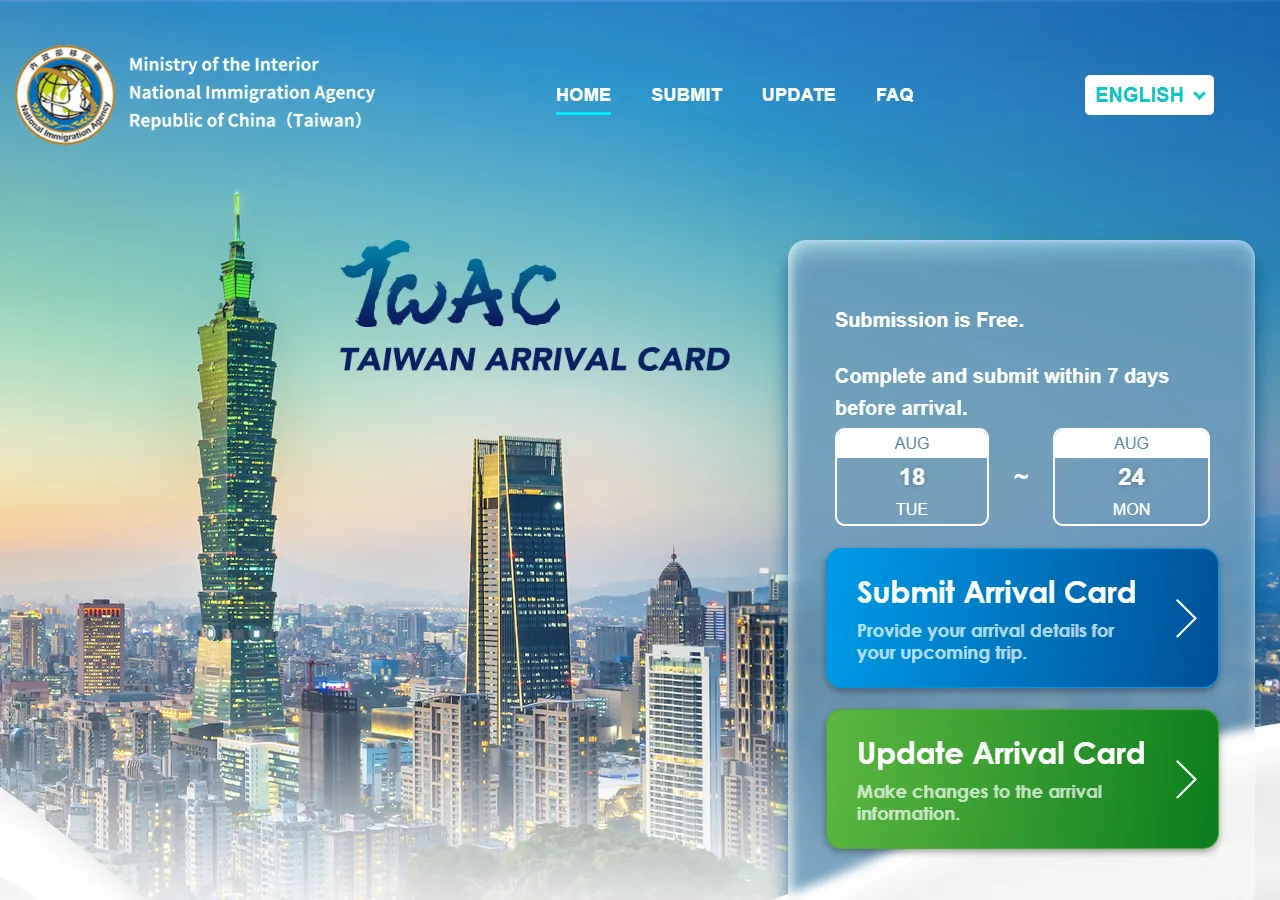
📸 About This Screenshot
This screenshot shows the latest official electronic entry card landing/login page. The step-by-step text guide below is based on the actual form structure, with detailed field instructions and common mistake warnings for your reference.
Service Selection
buttonRequiredClick "Submit Arrival Card" to file a new arrival card for your upcoming trip — this is the button almost all travellers need. "Update Arrival Card" is only for correcting a card you have already submitted.
⚠ Common Mistakes
- •Clicking "Update Arrival Card" when you actually need to submit a new one
- •Not noticing the language menu — the site defaults to Chinese/English and supports 7 languages
2Read the Notice
1fields
Read the Notice
1fields
Before the form opens, TWAC shows a notice page with the instructions for submitting the online arrival card. Read it, then click START to begin.
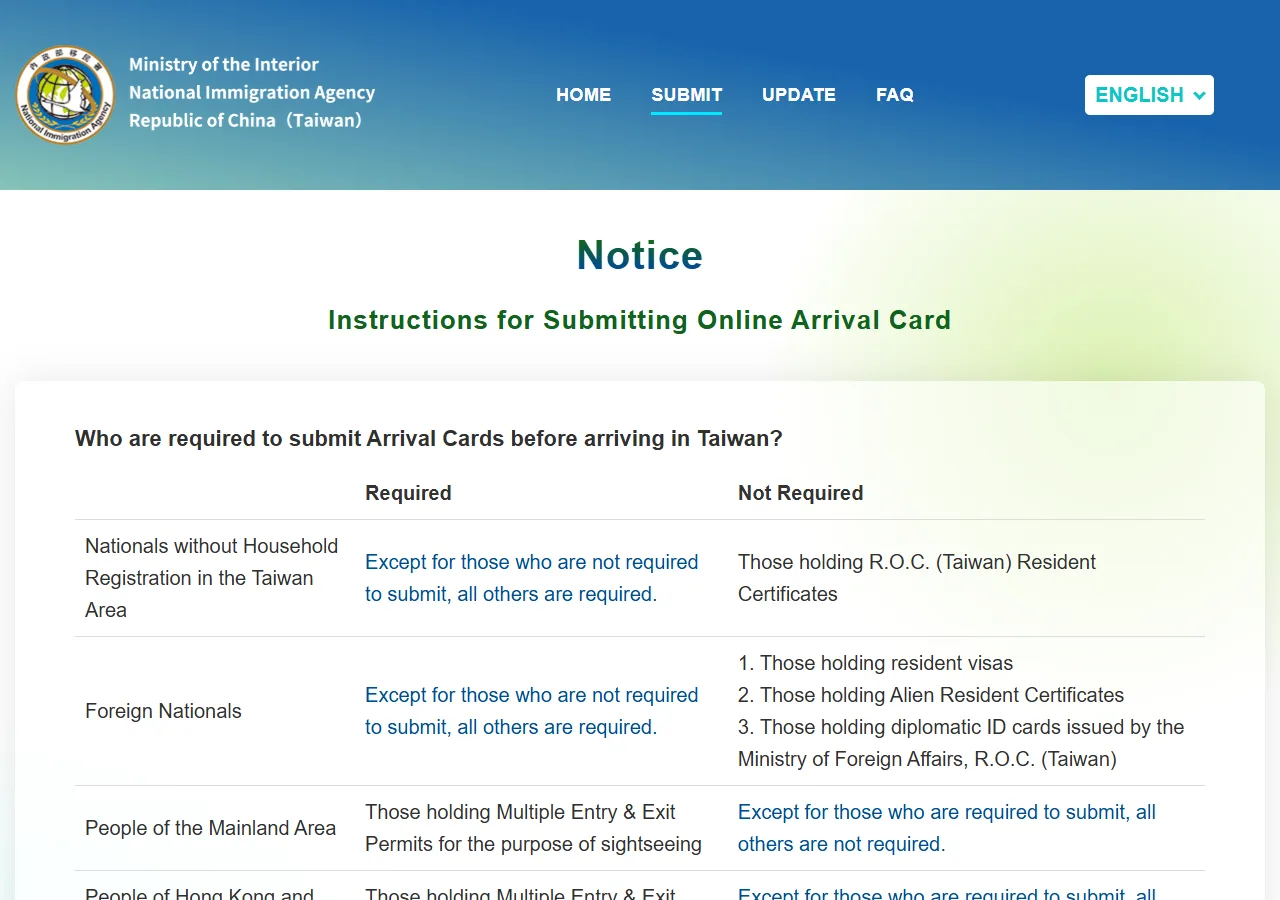
📸 About This Screenshot
This screenshot shows the latest official electronic entry card landing/login page. The step-by-step text guide below is based on the actual form structure, with detailed field instructions and common mistake warnings for your reference.
START Button
buttonRequiredClick START to proceed to the form. Clicking EXIT returns you to the landing page.
⚠ Common Mistakes
- •Skipping the notice and then being surprised by the required email verification step
3Verify Your Email
2fields
Verify Your Email
2fields
Enter your email address and click SEND VERIFICATION CODE. TWAC emails you an alphanumeric code — enter it and click VERIFY CODE. The whole form is split into 5 sections shown in the stepper at the top: Email Verification → Traveler Information → Itinerary → Review → Confirmation.
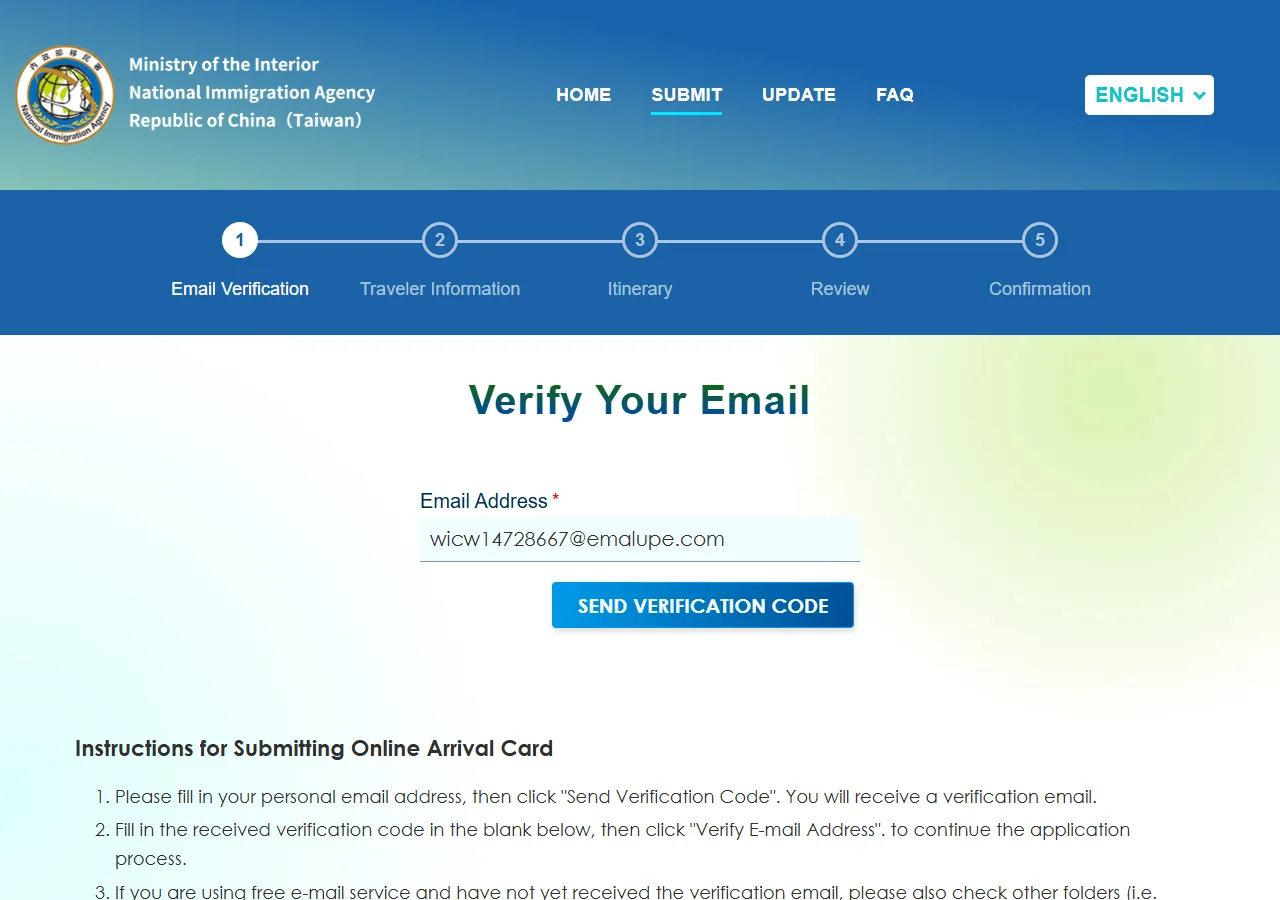
📸 About This Screenshot
This screenshot shows the latest official electronic entry card landing/login page. The step-by-step text guide below is based on the actual form structure, with detailed field instructions and common mistake warnings for your reference.
Email Address
emailRequiredUse an inbox you can access right now — the verification code arrives within a minute or two. The same address is later pre-filled in your traveler information and receives your QR code confirmation.
⚠ Common Mistakes
- •Typo in the email address — the verification code never arrives
- •Using an inbox you cannot access while travelling
Verification Code
textRequiredThe code mixes letters and numbers (e.g. eQcaJV). Check your spam folder if it does not arrive. Copy it exactly, including the letter case.
⚠ Common Mistakes
- •Misreading similar characters (0 vs O, l vs 1) when typing the code manually
- •Waiting too long — the code expires and you must request a new one
4Traveler Information (Passport & Personal Details)
9fields
Traveler Information (Passport & Personal Details)
9fields
The Traveler Information page collects your entry/departure dates, name, passport, gender, birth date, nationality, birthplace and visa type. Date fields use DD/MM/YYYY — just type the digits, the form adds the slashes. You can also upload or photograph your passport ("Retrieve passport data") to auto-fill the personal details.
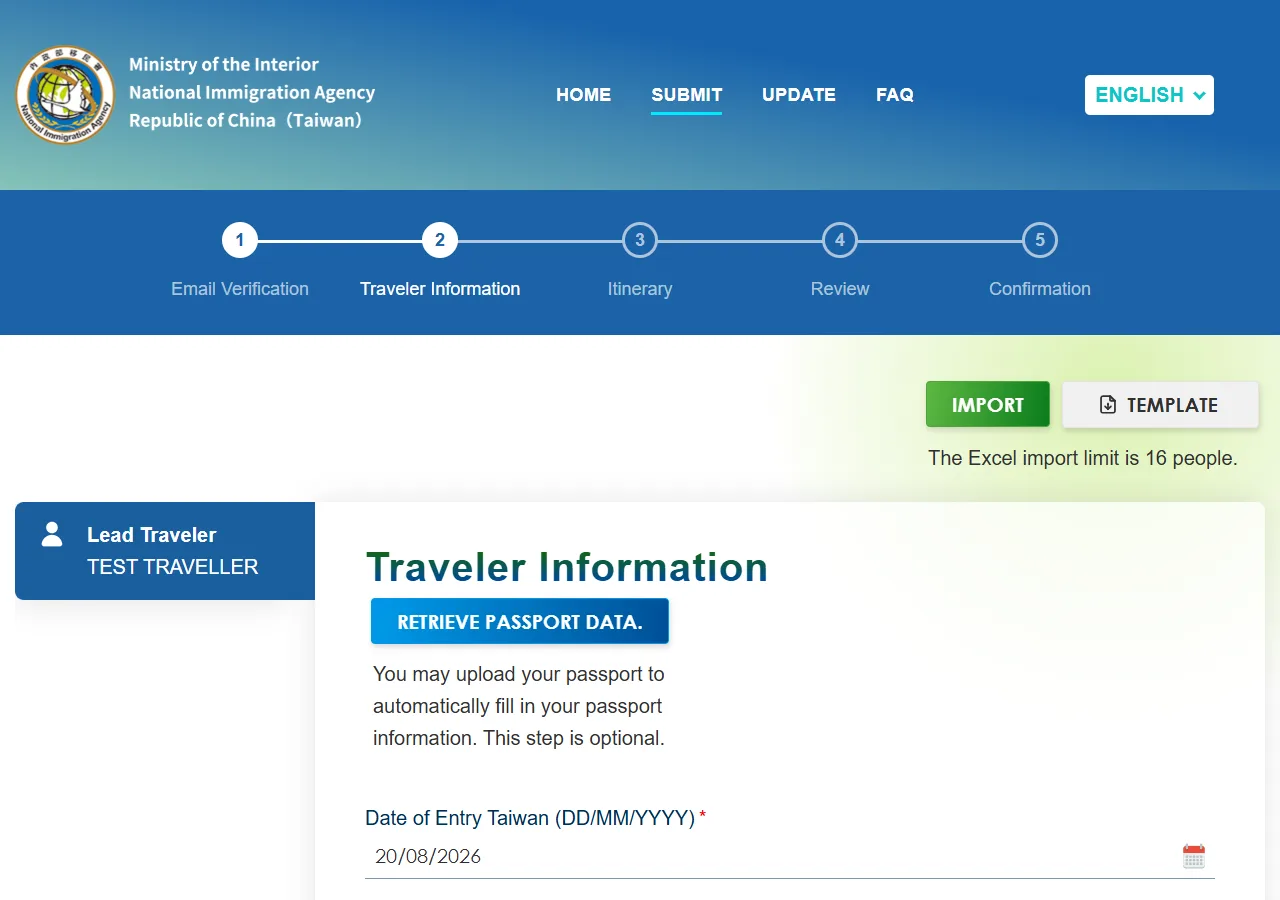
📸 About This Screenshot
This screenshot shows the latest official electronic entry card landing/login page. The step-by-step text guide below is based on the actual form structure, with detailed field instructions and common mistake warnings for your reference.
Date of Entry Taiwan
dateRequiredDD/MM/YYYY format. Type digits only — the form formats them for you. You can only file within 72 hours before arrival; earlier submissions are rejected.
⚠ Common Mistakes
- •Typing slashes into the date field — it becomes 01//01/2026
- •Trying to submit more than 72 hours before arrival
Expected Departure Taiwan Date
dateRequiredYour planned departure date, same digit-only input. It can be adjusted later if your plans change.
⚠ Common Mistakes
- •Confusing entry and departure dates
English Name
textRequiredMust match your passport exactly, including spelling and order. Use the name as printed in the machine-readable zone of your passport.
⚠ Common Mistakes
- •Adding a middle name that is not on the passport, or omitting one that is
Passport Number
textRequiredAs shown on the passport bio-data page. Mind similar characters: 0 (zero) vs O, 1 vs I.
⚠ Common Mistakes
- •Entering 0 as O or 1 as I
Gender
radioRequiredChoose MALE or FEMALE to match your passport.
⚠ Common Mistakes
- •Skipping this radio group — it is required
Date of Birth
dateRequiredDD/MM/YYYY, digits only. Must match your passport.
⚠ Common Mistakes
- •Mixing up day and month (e.g. 15/06 vs 06/15)
Nationality
selectRequiredA searchable dropdown of country codes and names (e.g. JPN, JAPAN). Type part of your country name to filter, then click the matching option. Holders of PRC passports will see additional entry-permit fields appear after selecting their nationality.
⚠ Common Mistakes
- •Typing too fast and selecting nothing — wait for the options to appear
- •Being confused when extra entry-permit fields appear (PRC passport holders)
Country / Place of Birth
selectRequiredSame searchable dropdown as nationality. Select the country where you were born, as printed in your passport.
⚠ Common Mistakes
- •Selecting your current country of residence instead of birthplace
Visa Type
radioRequiredThree options: "Visa-Exempt (include TAC)" for visa-free entry (also covers the Taiwan Arrival Card for residents of Hong Kong/Macau), "Holding a Visa" if you have a Taiwan visa, or "Landing Visa/Temporary Entry" for visas on arrival. Most tourists from visa-free countries choose the first option.
⚠ Common Mistakes
- •Choosing "Holding a Visa" just because your passport has visas for other countries
- •Not knowing that TAC (Taiwan Arrival Card) belongs to the Visa-Exempt option
5Traveler Information (Contact & Residence)
5fields
Traveler Information (Contact & Residence)
5fields
The lower half of the same page asks where you live, your phone details, occupation and email. Note that "Place of Residence" is actually a country list — pick the country you live in, not a city. Occupation is a dropdown with bilingual options such as ACCOUNTANT, CLERK/EMPLOYEE, ENGINEER, HOMEMAKER and IT.
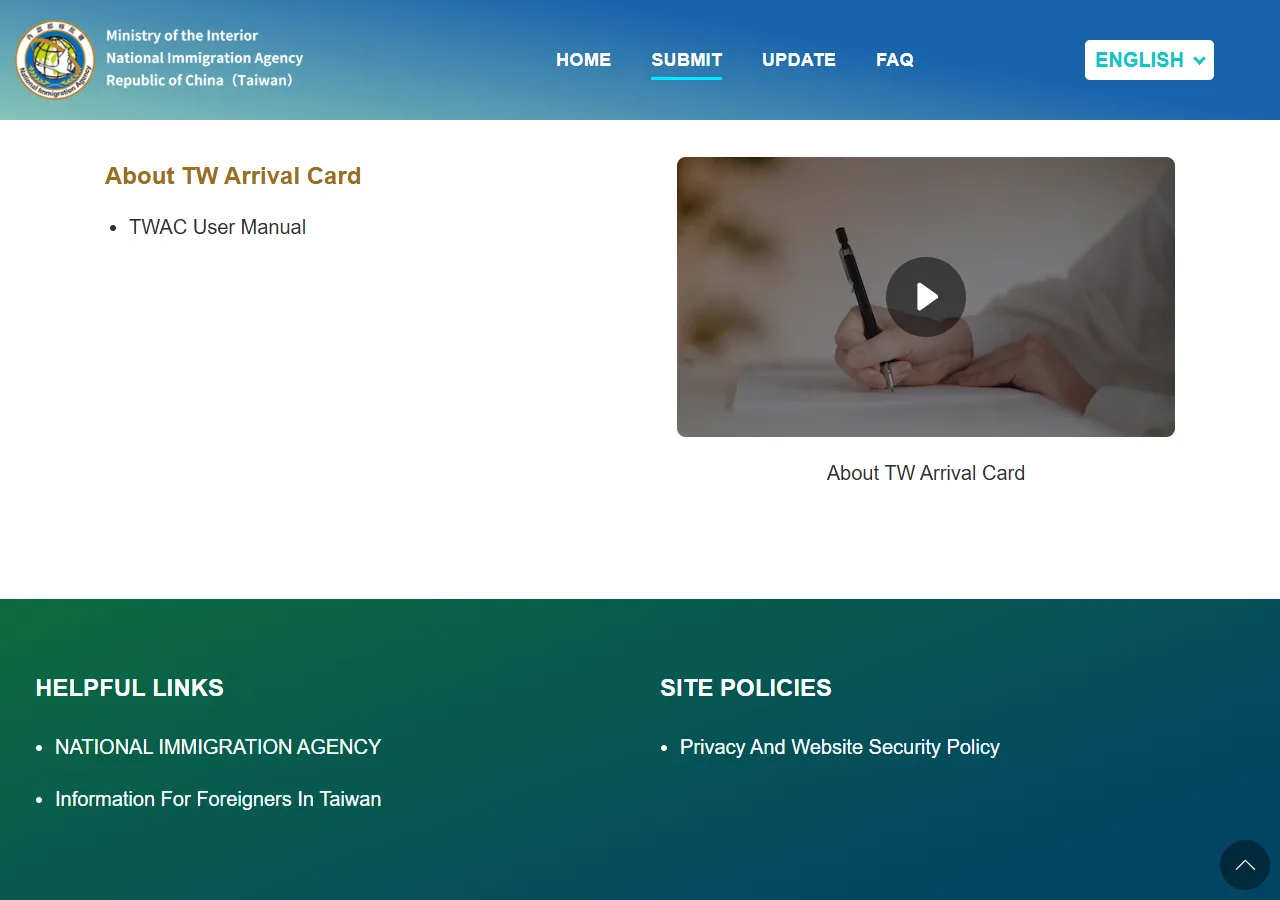
📸 About This Screenshot
This screenshot shows the latest official electronic entry card landing/login page. The step-by-step text guide below is based on the actual form structure, with detailed field instructions and common mistake warnings for your reference.
Place of Residence
selectRequiredDespite the name, this is a country list (e.g. JPN, JAPAN), not a city. Select the country where you currently live.
⚠ Common Mistakes
- •Trying to type a city name — no options will appear
- •Leaving this field empty — it is required and blocks the NEXT button
Country / Region Code (Phone)
selectRequiredSearchable dropdown in the format "dial code + country code" (e.g. 81 JPN). Type the dial code (81) or the country code (JPN) to filter — do not type the "+" sign.
⚠ Common Mistakes
- •Typing "+81" — the "+" prevents any match
- •Leaving this empty — required, NEXT will not advance
Mobile Number
textRequiredEnter your mobile number without the country code (it was selected separately above). Used for contact if immigration needs to reach you.
⚠ Common Mistakes
- •Including the country code twice (once in the dropdown, once in the number)
Occupation
selectRequiredA dropdown with 40+ bilingual options (e.g. CLERK/EMPLOYEE/STAFF, ENGINEER, HOMEMAKER, IT). Pick the closest match.
⚠ Common Mistakes
- •Leaving the default "Please Select" — required field
Email Address
emailRequiredPre-filled with the address you verified in step 3. Keep it — your QR code confirmation is sent here.
⚠ Common Mistakes
- •Changing to an unverified address after completing email verification
6Itinerary, Review & Submit
3fields
Itinerary, Review & Submit
3fields
After the traveler information, the stepper continues with Itinerary → Review → Confirmation. On the Itinerary page, enter the address of your first night's stay in Taiwan (hotel name and address — Traditional Chinese or English are both accepted) and your arrival flight number. Review all entries on the Review page, then submit. Approval is instant — the QR code appears on the Confirmation page right away, and a copy is emailed to you.
Address in Taiwan (First Night)
textRequiredEnter your first night's hotel name and address. Traditional Chinese or English are both accepted.
⚠ Common Mistakes
- •Leaving the address blank or entering only the city name without a hotel
Arrival Flight Number
textRequiredThe flight number of the flight that brings you into Taiwan, e.g. SQ876. Enter it exactly as on your boarding pass.
⚠ Common Mistakes
- •Entering a connecting flight instead of the arrival flight
Submit & QR Code
buttonRequiredCheck every detail on the Review page before submitting. Approval is instant — no waiting for review. Save or screenshot the QR code on the Confirmation page; it is also emailed to you. Note that the TWAC does not replace e-Gate registration — if you plan to use Taiwan's automated e-Gate, you still need the arrival card, and e-Gate enrolment is a separate airport counter process.
⚠ Common Mistakes
- •Submitting without checking — corrections after submission require the Update Arrival Card service
- •Assuming e-Gate usage removes the need to fill the TWAC
💬 Travel Experience Exchange
Applying or already traveled? Share your entry/exit experience, real problems encountered, or recent changes to help fellow travelers — our editors will also respond regularly.
- Share pitfalls or surprises during your entry process
- Let others know about recent entry procedure changes
- Read the guide and warnings above before asking
- Comments are moderated by the editorial team; inappropriate content is removed
💬 Leave a comment
Just enter your name and comment.