Singapore SG Arrival Card (SGAC)
Arrival Card Asia | SG Arrival Card
August 7, 2026
✈️ Before You Go
Singapore’s SG Arrival Card (SGAC) is your digital passport to a smooth entry—but only if you treat it with respect. Who needs it? Nearly every foreign visitor, including transit passengers who clear immigration, and even Singapore residents returning via land or sea. The real timing? Submit it within three days before arrival—not earlier, not at the gate. Many first-timers are shocked to learn that the SGAC is not a visa; it’s a health and customs declaration, and skipping it can mean a long queue at the kiosk or a stern talk with an officer. Another surprise: the form asks for your flight number and seat—so have your boarding pass handy. Here’s an insider tip: after you submit, screenshot the confirmation page—not the email, which can lag. That QR code is your golden ticket through the automated lanes. Do it right, and you’ll be sipping kopi at a hawker center within 20 minutes of landing. Do it wrong, and you’ll be that person frantically re-filling forms on a tiny phone screen. Plan ahead, stay calm, and let Singapore welcome you the way it does best—efficiently.
⚠️ Important Notes
Fill Time Window
Complete within 3 days before arrival (including the day of arrival)
Cost
Free
0- • Must submit within 3 days before arrival (including the day of arrival) — not earlier than 3 days
- • Each traveler must submit individually, including children and infants
- • Singapore citizens, permanent residents, and long-term pass holders are exempt
- • You will receive a confirmation email after submission — show it at immigration. Print or screenshot as backup
- • Transit passengers not passing through immigration do not need SGAC
- • SGAC is completely free — the ICA official website eservices.ica.gov.sg is the only legitimate portal
- • Passport number must match exactly — be careful with 0 (zero) vs O (letter) confusion
- • Use a valid email address that can receive international mail — Gmail/Outlook recommended. Confirmation will be sent there
- • Accommodation: enter full hotel name and address. If staying with friends/family, provide complete residential address with postal code
- • Travelers registered for Automated Clearance Initiative (ACI) still need to complete SGAC — the two are not interchangeable
- • If the official site is in a language you don't speak, use your browser's built-in translation — third-party translation extensions may break form validation.
📋 Field Guide
| Field Name | Tips & Notes |
|---|---|
Name (as in Passport) Name (as in Passport) | Enter exactly as in passport. Separate surname and given name correctly. |
Passport Number Passport Number | Must match passport exactly. Watch for 0 vs O confusion. |
Email Address Email Address | Use a valid email — confirmation will be sent here. Gmail/Outlook recommended. |
Accommodation in Singapore Accommodation in Singapore | Enter hotel name and address, or full residential address if staying with friends/family. |
Step-by-Step Guide
💡 Before You Start
Before you begin, have your passport, flight details, and accommodation information ready. Ensure you are within the 3-day window before your arrival date. Note that Singapore citizens, permanent residents, and long-term pass holders do not need to fill out the SGAC. If you are transiting without leaving the airport, you are exempt.
1Access the SGAC Portal
1fields
Access the SGAC Portal
1fields
The official portal offers three services. Individual foreign visitors can submit without creating any account.
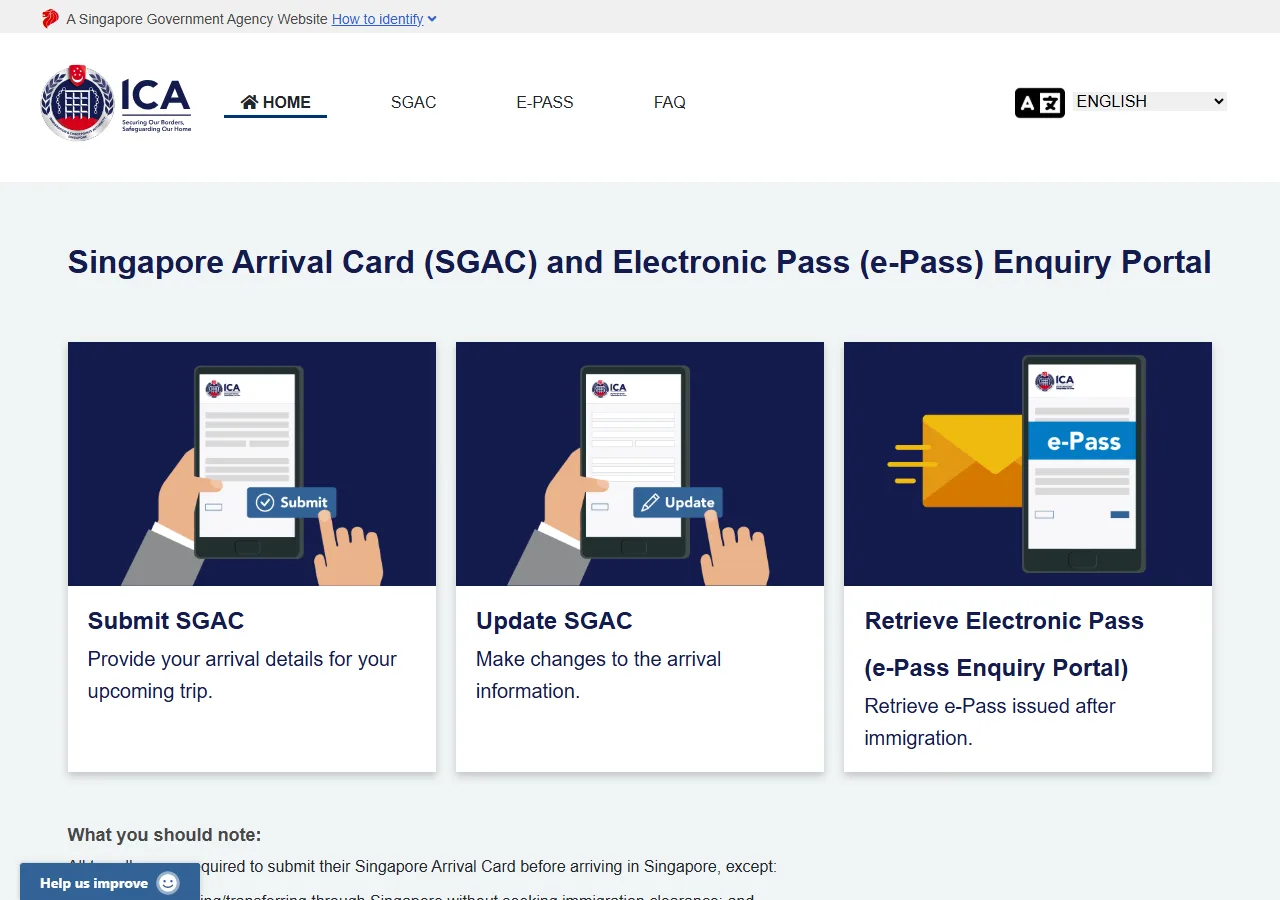
📸 About This Screenshot
This screenshot shows the latest official electronic entry card landing/login page. The step-by-step text guide below is based on the actual form structure, with detailed field instructions and common mistake warnings for your reference.
Submission Type
selectRequiredChoose "Submit SGAC" to file a new arrival card for your upcoming trip. "Update SGAC" is for changing a card you already submitted; "Retrieve Electronic Pass" downloads your e-Pass after entry. Individual foreign visitors do NOT need to create an account.
⚠ Common Mistakes
- •Clicking "Retrieve Electronic Pass" before you have entered Singapore
2Select Traveller Type
1fields
Select Traveller Type
1fields
After choosing "Submit SGAC", pick the category that describes you. Most visitors use the Foreign Visitor option.
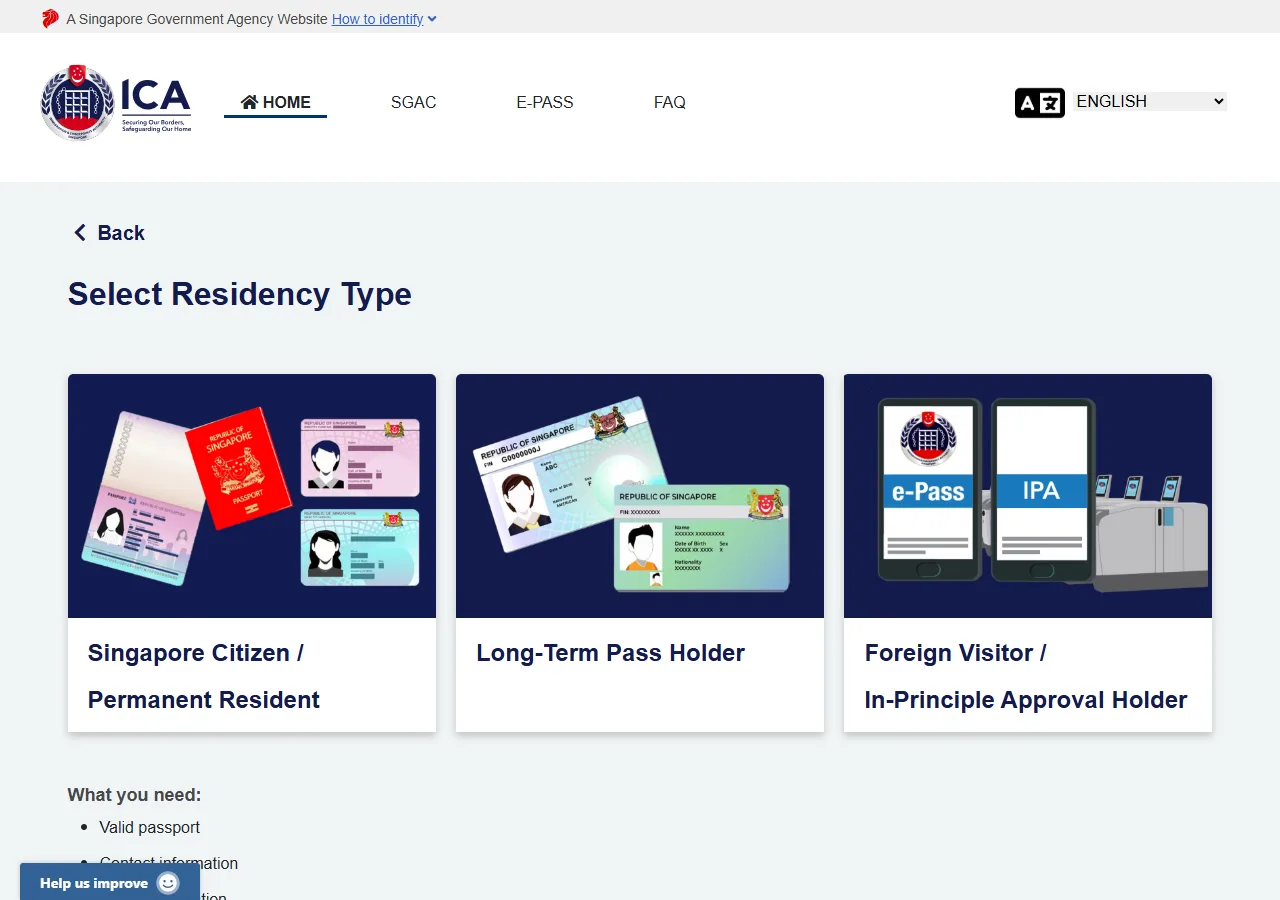
📸 About This Screenshot
This screenshot shows the latest official electronic entry card landing/login page. The step-by-step text guide below is based on the actual form structure, with detailed field instructions and common mistake warnings for your reference.
Residency Type
selectRequiredMost short-term visitors choose "Foreign Visitor / In-Principle Approval (IPA) Holder". Singapore citizens, permanent residents and long-term pass holders do not need to fill the SGAC at all.
⚠ Common Mistakes
- •Choosing a Singapore Citizen/PR/LTP option "just in case" — the form is not for you
3Arrival Date & Passport Details
6fields
Arrival Date & Passport Details
6fields
Pick the arrival date from the calendar strip, then enter your passport details exactly as printed on the passport data page.
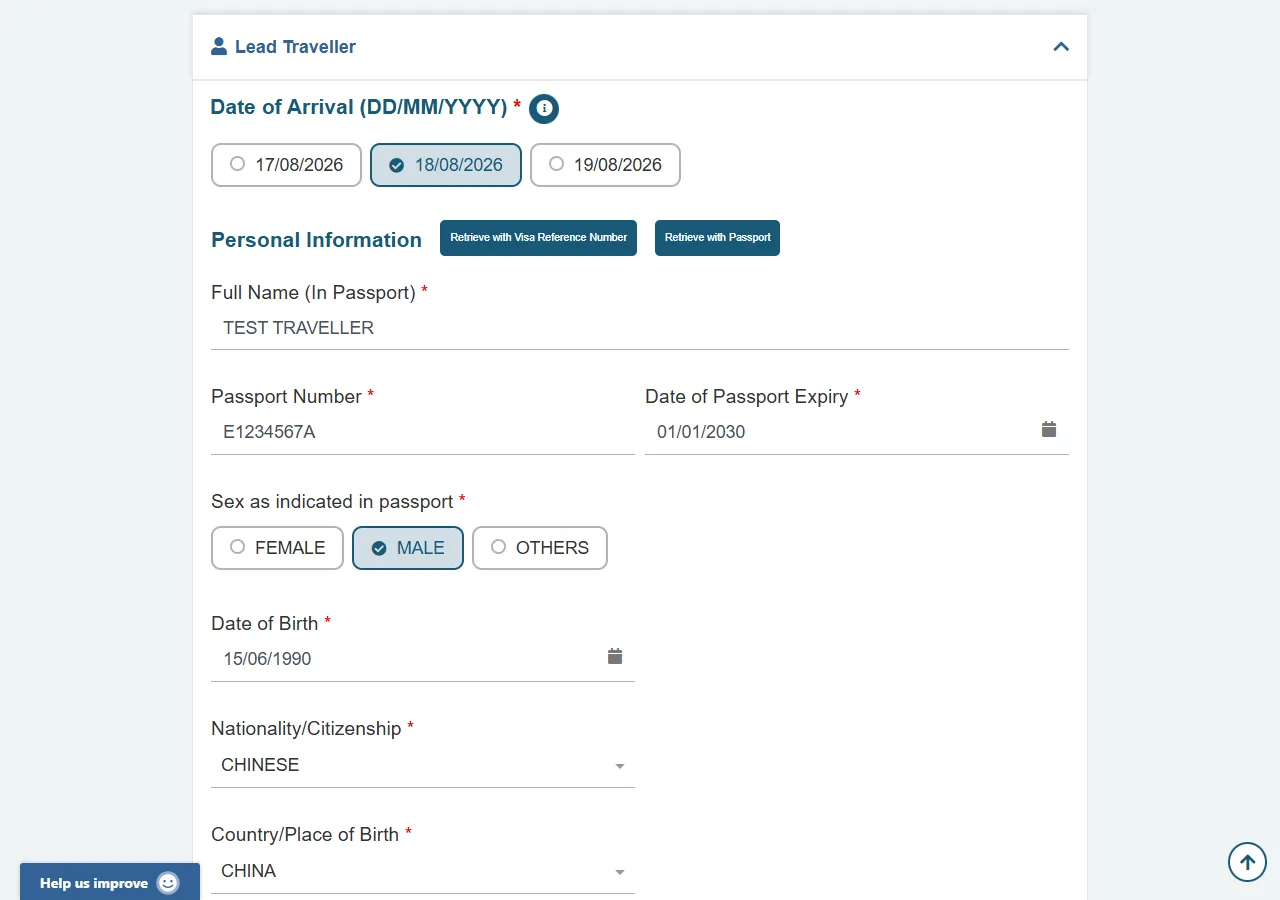
📸 About This Screenshot
This screenshot shows the latest official electronic entry card landing/login page. The step-by-step text guide below is based on the actual form structure, with detailed field instructions and common mistake warnings for your reference.
Date of Arrival
dateRequiredPick your arrival date from the calendar strip shown. The SGAC can only be submitted within 3 days (including the day) before your arrival in Singapore.
⚠ Common Mistakes
- •Trying to submit more than 3 days before arrival — the form will not accept the date
Name (as in Passport)
textRequiredEnter your full name exactly as it appears on your passport, including the order of given name and surname. Do not use nicknames or abbreviations. If your passport has a middle name, include it. Match the spelling and capitalization exactly.
⚠ Common Mistakes
- •Reversing the given name and surname order
- •Using a nickname or shortened name instead of the full passport name
Passport Number
textRequiredEnter the passport number exactly as printed on your passport. It is usually alphanumeric (e.g., E1234567A). Pay attention to characters that look similar, such as '0' (zero) and 'O' (letter O), and '1' (one) and 'I' (capital i). Do not include spaces or hyphens.
⚠ Common Mistakes
- •Confusing '0' (zero) with 'O' (letter O) in the passport number
- •Adding spaces or hyphens that are not present on the passport
Date of Passport Expiry
dateRequiredEnter the expiry date printed on your passport data page. The passport must be valid at the time of entry.
⚠ Common Mistakes
- •Mixing up expiry and issue date
Date of Birth
dateRequiredSelect your date of birth using the calendar picker or enter it in the format DD/MM/YYYY. Ensure the date matches your passport exactly. Double-check the day and month order to avoid errors.
⚠ Common Mistakes
- •Swapping day and month (e.g., entering 05/11 instead of 11/05)
- •Selecting the wrong year due to a typo
Nationality / Citizenship
selectRequiredSearch and select your nationality as shown in your passport. The list uses demonyms (e.g. "CHINESE", not "CHINA"). This practice list shows common examples only — the official dropdown contains every nationality.
⚠ Common Mistakes
- •Typing the country name instead of the nationality (CHINA vs CHINESE) and seeing "No items found"
4Contact Details & Health Declarations
5fields
Contact Details & Health Declarations
5fields
Provide your email and mobile number to receive the card, then answer the three health and travel-history questions honestly.
📸 About This Screenshot
This screenshot shows the latest official electronic entry card landing/login page. The step-by-step text guide below is based on the actual form structure, with detailed field instructions and common mistake warnings for your reference.
Email Address
emailRequiredEnter a valid email address that you have access to. This will be used for login and to receive the confirmation email after submission. Use the same email for all travelers in your group if you are submitting on behalf of others.
⚠ Common Mistakes
- •Using a typo in the email address, which prevents receiving the confirmation
- •Using a shared email that you cannot access later
Mobile Number
telRequiredChoose your country/region code from the prefix field, then enter the mobile number without the leading zero. The confirmation and the e-Pass are sent here.
⚠ Common Mistakes
- •Including the leading zero of the local number after the country code
Used a passport under a different name before?
radioRequiredAnswer honestly. If you answer YES, you must provide the previous passport details. False declarations are an offence under Singapore law.
⚠ Common Mistakes
- •Answering NO when a previous passport had a different name spelling
Do you have any symptoms of illness?
radioRequiredSelect 'Yes' if you are currently experiencing any symptoms such as fever, cough, runny nose, or sore throat. Be honest, as this information is used for health screening at the border. If you select 'Yes', you may be subject to additional health checks upon arrival.
⚠ Common Mistakes
- •Underreporting symptoms to avoid delays
- •Misinterpreting 'symptoms' as only severe illness
Visited Africa or Latin America in the last 6 days?
radioRequiredThis is the yellow-fever risk question: countries listed by Singapore's Communicable Diseases Agency (CDA). Answer YES only if you were in a listed country within the 6 days before arrival; a yellow fever vaccination certificate may then be required.
⚠ Common Mistakes
- •Answering NO while carrying a yellow fever vaccination card from a listed country
5Trip & Accommodation Details
7fields
Trip & Accommodation Details
7fields
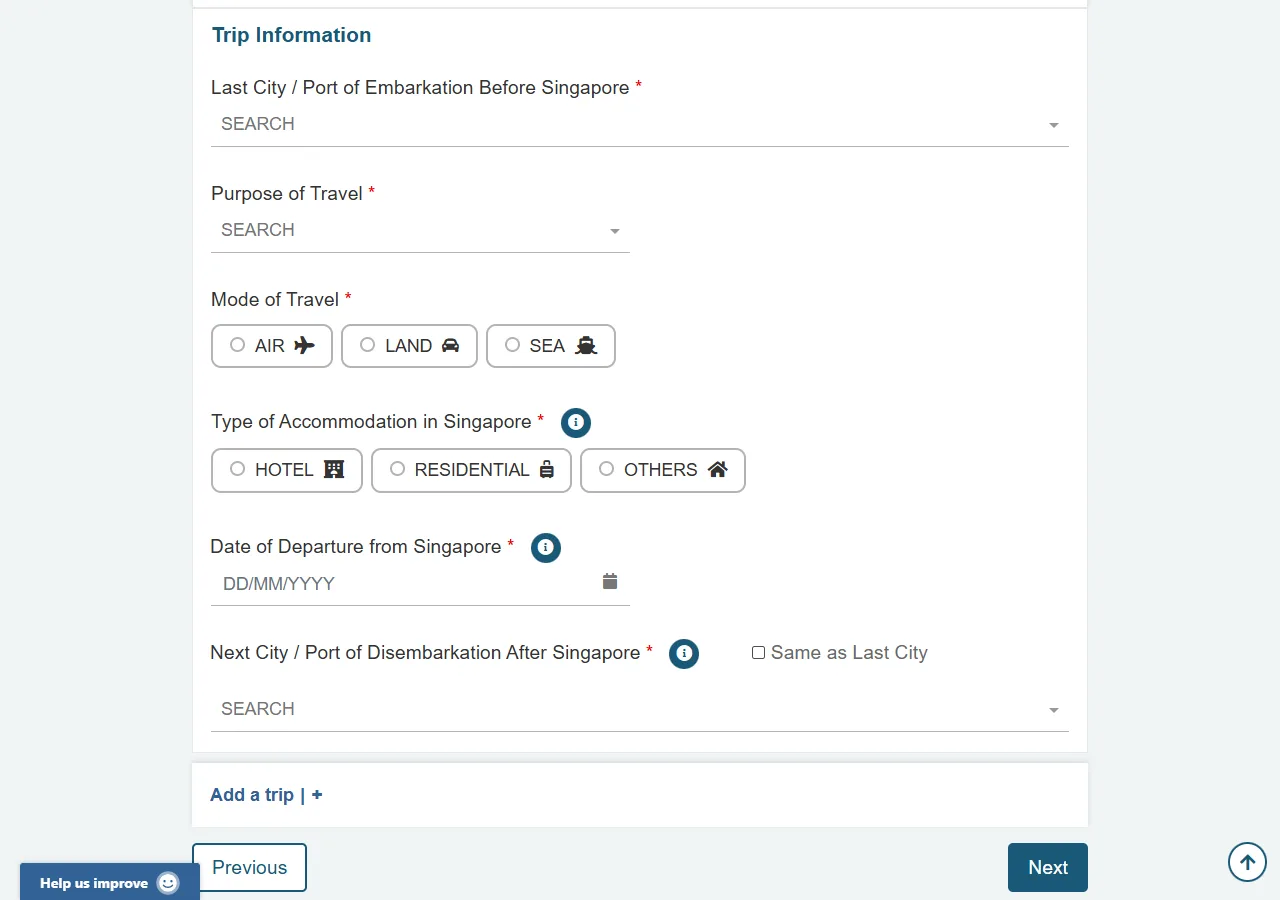
Describe your journey: where you boarded, why you travel, the transport you use, and where you will stay in Singapore.
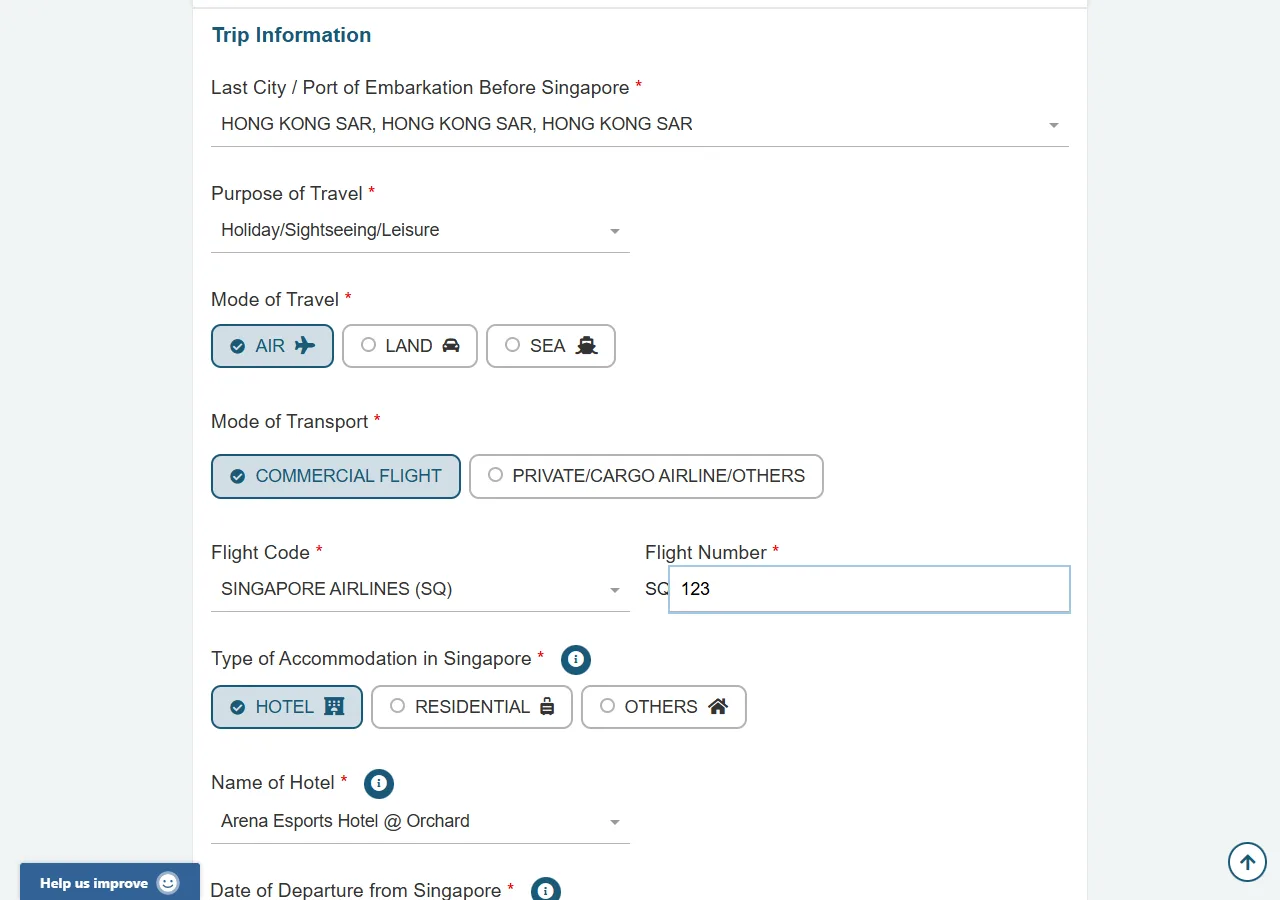
📸 About This Screenshot
This screenshot shows the latest official electronic entry card landing/login page. The step-by-step text guide below is based on the actual form structure, with detailed field instructions and common mistake warnings for your reference.
Last City / Port of Embarkation
selectRequiredThe city or port where you boarded the transport that brings you to Singapore (e.g. the city you fly from).
⚠ Common Mistakes
- •Entering the transit airport instead of the actual embarkation city
Purpose of Travel
selectRequiredOptions include Holiday/Sightseeing/Leisure, Business/Meeting, Visiting Friends/Relatives, Transit, etc. Choose the one that best matches your trip.
⚠ Common Mistakes
- •Selecting "Transit" when you will actually pass immigration into Singapore
Mode of Travel
radioRequiredChoose AIR, LAND or SEA. If you fly commercially, also pick "COMMERCIAL FLIGHT" and enter the two-letter airline code and flight number.
⚠ Common Mistakes
- •Skipping the airline code / flight number fields that appear after choosing the flight option
Flight Code & Number
textRequiredEnter the two-letter airline code (e.g. SQ for Singapore Airlines) and the flight number as printed on your ticket or boarding pass.
⚠ Common Mistakes
- •Entering the booking reference (PNR) instead of the flight number
Accommodation Type
selectRequiredSelect the type of accommodation you will be staying at, such as 'Hotel', 'Residential Address', 'Serviced Apartment', or 'Others'. If you are staying with friends or family, select 'Residential Address'. If you are unsure, choose the closest match.
⚠ Common Mistakes
- •Selecting 'Hotel' when staying at a private residence
- •Choosing 'Others' without providing a clear description
Name of Hotel
textRequiredSearch and select your hotel from the list. If you chose RESIDENTIAL or OTHERS, enter the address of where you will stay.
⚠ Common Mistakes
- •Typing a free-text hotel name instead of picking the matching entry from the list
Date of Departure from Singapore
dateRequiredThe date you will leave Singapore. Provide your best estimate if you have not booked the return leg yet.
⚠ Common Mistakes
- •Entering the departure date of your inbound flight instead of the date you leave Singapore
6Review & Submit
2fields
Review & Submit
2fields
Check every section on the summary page, tick the declaration and submit. Keep the confirmation details — you will use them to retrieve your e-Pass.
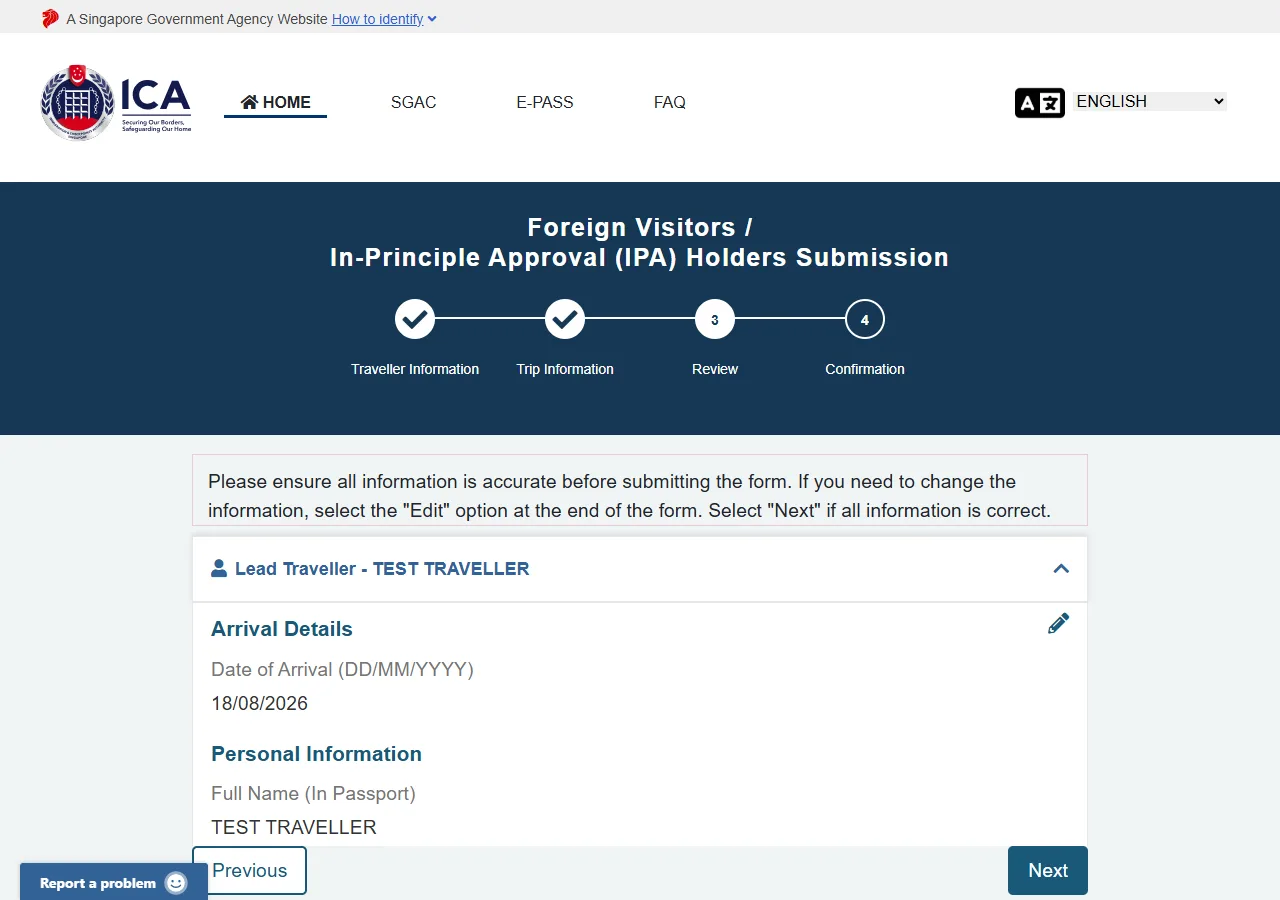
📸 About This Screenshot
This screenshot shows the latest official electronic entry card landing/login page. The step-by-step text guide below is based on the actual form structure, with detailed field instructions and common mistake warnings for your reference.
Declaration Agreement
checkboxRequiredRead the declaration, tick "I have read and agreed" and submit. Your SGAC will be sent to the email/phone you provided; you can retrieve your e-Pass through the portal after entry.
⚠ Common Mistakes
- •Submitting without checking the summary page — errors cannot be changed after submission (you must file "Update SGAC" instead)
Submit
buttonRequiredClick the 'Submit' button to finalize your SG Arrival Card. After submission, you will receive a confirmation email. Save a screenshot or print the confirmation to show at immigration. Each traveler must have their own SGAC, including children and infants.
⚠ Common Mistakes
- •Forgetting to save or print the confirmation
- •Submitting only one form for a family group
🎯 Rehearse before you go?
Rehearse the official form field by field — guidance and common pitfalls inline. Export your answers as a reference card, then breeze through the real form.
📅 Submission window countdown
Officially: submit within 3 days before arrival (arrival day included); earlier submissions are rejected by the system.
💬 Travel Experience Exchange
Applying or already traveled? Share your entry/exit experience, real problems encountered, or recent changes to help fellow travelers — our editors will also respond regularly.
- Share pitfalls or surprises during your entry process
- Let others know about recent entry procedure changes
- Read the guide and warnings above before asking
- Comments are moderated by the editorial team; inappropriate content is removed
💬 Leave a comment
Just enter your name and comment.