Sri Lanka ETA (Electronic Travel Authorization)
e-Visa / ETA Asia | ETA Sri Lanka
August 7, 2026
✈️ Before You Go
Skip the preconception that Sri Lanka’s ETA is a mere formality—it’s your digital gatekeeper, required for most nationalities (excluding Singapore, Maldives, and Seychelles, who get free visas on arrival). The online application looks quick, but budget 30–45 real minutes, not the 5-minute promise, because the site’s session times out frequently and credit card verification is finicky. The biggest shock for first-timers? Your ETA is tied to your passport number, so if you renew your passport after approval, the ETA becomes void—you must reapply. Also, the system rejects one-letter name typos, so triple-check spelling. A tip from repeat visitors: apply exactly 7 days before arrival, not earlier—the ETA is valid for 30 days from approval, and if you apply too early, you’ll lose days at the end of your trip. Finally, print a physical copy; immigration officers occasionally ask for it, and phone screens can lag at the counter. Do this, and you’ll breeze through Colombo’s arrivals.
⚠️ Important Notes
Application Window
Apply at least 2 weeks in advance. Typically approved within 24-72 hours. Valid for entry within 30 days of approval.
Cost
Standard ETA from approx. USD 20, varies by nationality and visa type
Fees are subject to change — always confirm on the official site.
- • Only use the official eta.gov.lk — avoid expensive third-party agent sites claiming express processing
- • ETA is valid for 30 days from entry date, allows double entry, with each stay up to 30 days
- • After submission, check your email (including spam folder) for the approval letter — you must present it at immigration
- • Passport must be valid for at least 6 months from arrival
- • Sri Lanka ETA is an electronic travel authorization, not a visa — the immigration officer still has the final decision on entry
- • Children and infants also need their own separate ETA — cannot be added to a parent's application
- • The Sri Lankan government website eta.gov.lk may be unstable — using a desktop browser rather than mobile is recommended
- • ETA information (passport number, name) must match the passport exactly — any discrepancy will result in denied entry
- • ETA fees vary by nationality and visa type — check the official website for the latest rates before applying
- • Transit passengers not leaving the airport with a stay under 48 hours are exempt from ETA — stays over 48 hours require an ETA
📋 Application Field Guide
| Field Name | Tips & Notes |
|---|---|
Passport Number Passport Number | Enter exactly as on passport bio page. Standard format: 1-2 letters followed by 6-8 digits (e.g. N1234567 or AB123456). Watch for 0 vs O and 1 vs I. |
Date of Birth Date of Birth | Must match the passport exactly, or the application may be rejected. |
Port of Entry Port of Entry | Select the actual arrival point, e.g. Bandaranaike International Airport Colombo. |
Email Address Email Address | Use an email you check often — approval is sent here. International providers recommended. |
Step-by-Step Application Guide
💡 Before You Start
Before starting, ensure your passport is valid for at least 6 months from your intended arrival date in Sri Lanka. Have your travel itinerary, accommodation details, and a valid credit/debit card ready. Only use the official website eta.gov.lk to avoid scams.
1Account Creation & Login
2fields
Account Creation & Login
2fields
Create a new account or log in to the official ETA portal to start your application.
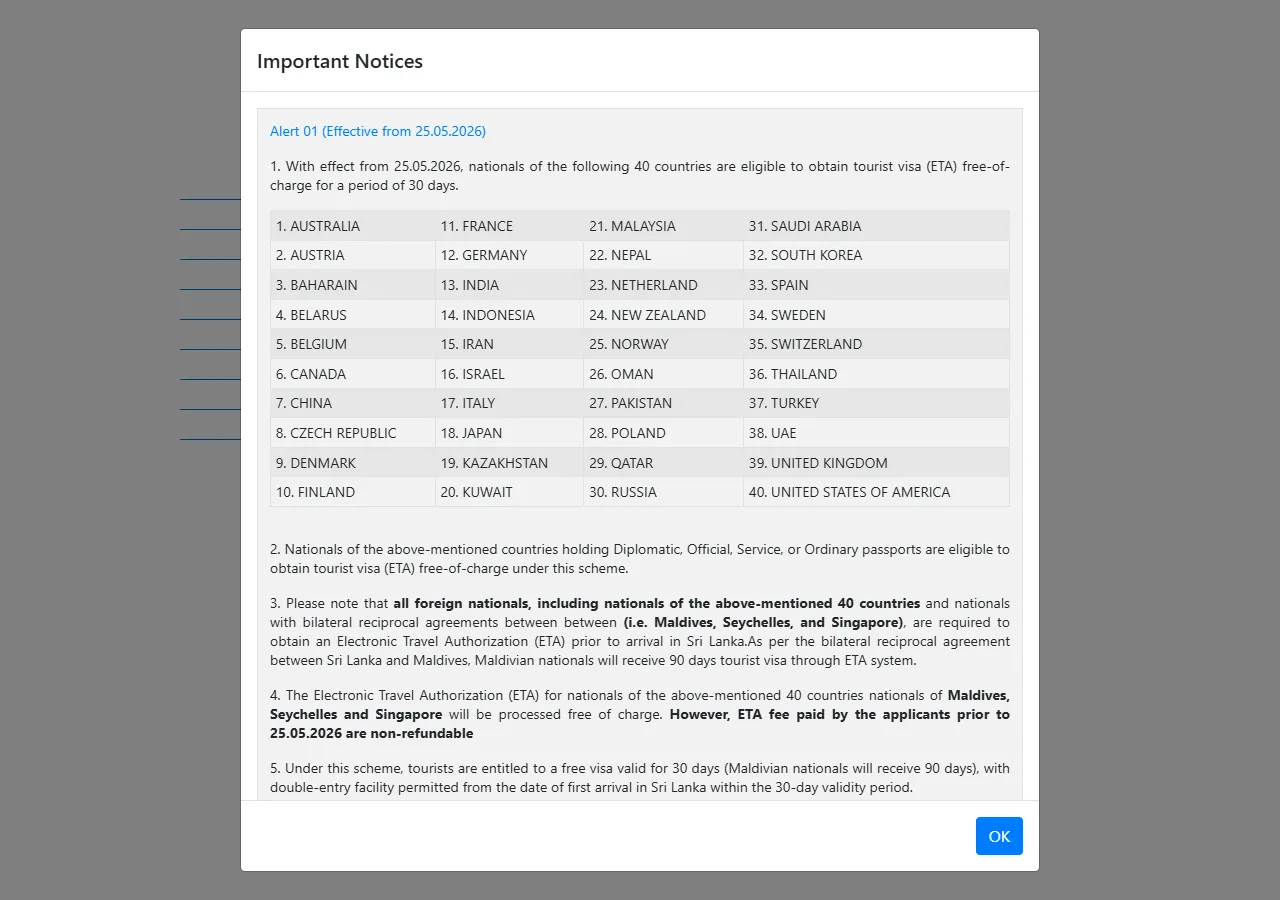
📸 About This Screenshot
This screenshot shows the latest official electronic entry card landing/login page. The step-by-step text guide below is based on the actual form structure, with detailed field instructions and common mistake warnings for your reference.
Email Address
emailRequiredEnter a valid email address that you check regularly. This email will receive your ETA approval letter and all official correspondence. Use the same email for future applications and ensure it is not a temporary or shared address.
⚠ Common Mistakes
- •Using a typo in the email address, causing the approval letter to be sent to the wrong inbox.
- •Providing a rarely checked email, missing the approval notification.
Password
passwordRequiredCreate a strong password with at least 8 characters, including uppercase and lowercase letters, numbers, and special symbols. Do not use easily guessable information like your name or birthdate. Store it securely as you will need it to check your application status.
⚠ Common Mistakes
- •Using a weak password that is easy to guess, risking account security.
- •Forgetting the password and being unable to log in to check application status.
2Personal Information
4fields
Personal Information
4fields
Provide your identity details below. The golden rule of e-visa forms: if it's not on your passport, it doesn't go here.
Full Name (as on Passport)
textRequiredEnter your full name exactly as printed on your passport, including any middle names. Use the same order (surname first or given name first) as shown on the passport. Do not use nicknames or abbreviations.
⚠ Common Mistakes
- •Reversing the order of first and last names, causing a mismatch with the passport.
- •Omitting a middle name that appears on the passport.
Date of Birth
dateRequiredEnter your date of birth in the format DD/MM/YYYY (day/month/year). Use the date exactly as recorded on your passport. Be careful not to transpose digits, as this can cause delays or rejection.
⚠ Common Mistakes
- •Entering the date in MM/DD/YYYY format instead of DD/MM/YYYY, leading to errors.
- •Mistyping the year, e.g., 1990 instead of 1980.
Passport Number
textRequiredEnter your passport number exactly as printed on the biographical page of your passport. It is typically alphanumeric (e.g., N1234567). Do not include spaces or hyphens. Double-check for common confusions: letter O vs digit 0, and letter I vs digit 1.
⚠ Common Mistakes
- •Confusing the letter O with the digit 0 in the passport number.
- •Including spaces or hyphens that are not part of the actual number.
Nationality
selectRequiredSelect your nationality from the dropdown list. This should match the country that issued your passport. If you have dual nationality, use the passport you will travel with.
⚠ Common Mistakes
- •Selecting the country of residence instead of the passport-issuing country.
- •Choosing the wrong nationality due to similar country names.
3Travel Details
3fields
Travel Details
3fields
Provide information about your intended arrival and stay in Sri Lanka.
Port of Entry
selectRequiredSelect the airport or seaport where you will first arrive in Sri Lanka. The main international airport is Bandaranaike International Airport (CMB) in Colombo. Other options include Mattala Rajapaksa International Airport (HRI) and various seaports. Choose the one that matches your travel itinerary.
⚠ Common Mistakes
- •Selecting the wrong airport, especially if you have a connecting flight to a domestic airport.
- •Choosing a seaport when you are arriving by air, or vice versa.
Date of Arrival
dateRequiredEnter the date you plan to arrive in Sri Lanka. This must be within 30 days of the ETA approval date. Use the format DD/MM/YYYY. Ensure the date is realistic and matches your flight or travel plans.
⚠ Common Mistakes
- •Entering a date more than 30 days after the ETA approval, making the ETA invalid.
- •Selecting a past date due to a typo or confusion.
Duration of Stay (Days)
numberRequiredEnter the number of days you intend to stay in Sri Lanka. This must not exceed 30 days per visit. The ETA allows double entry, but each stay is limited to 30 days. Be realistic and do not overstate your intended stay.
⚠ Common Mistakes
- •Entering more than 30 days, which is not allowed for ETA holders.
- •Entering a number that is inconsistent with your return flight date.
4Contact & Address Details
2fields
Contact & Address Details
2fields
Provide your contact information and address in Sri Lanka.
Phone Number (with Country Code)
textRequiredEnter your mobile or landline number in international format, including the country code. For example, for a US number, enter +1XXXXXXXXXX. Do not include spaces or dashes. This number may be used for verification or emergency contact.
⚠ Common Mistakes
- •Omitting the country code, making the number invalid for international contact.
- •Including spaces or dashes, which may cause formatting errors.
Address in Sri Lanka
textRequiredEnter the full address where you will stay in Sri Lanka, such as a hotel, guesthouse, or private residence. Include the street name, city, and postal code if available. If you have not booked accommodation yet, provide the address of your first hotel or a planned location.
⚠ Common Mistakes
- •Entering an incomplete address, such as only the city name.
- •Providing a residential address in your home country instead of Sri Lanka.
5Declarations & Security Questions
2fields
Declarations & Security Questions
2fields
Answer security and health-related questions truthfully to complete your application.
Have you ever been convicted of a criminal offense?
radioRequiredSelect 'Yes' or 'No' truthfully. If you answer 'Yes', you may be required to provide additional details. Providing false information can lead to rejection or entry denial. If you are unsure, answer 'No' only if you have no criminal record.
⚠ Common Mistakes
- •Answering 'No' despite having a criminal record, which can lead to serious consequences.
- •Misunderstanding the question and answering based on minor traffic violations that are not criminal offenses.
Do you have any infectious diseases?
radioRequiredAnswer truthfully. If you have a contagious disease that poses a public health risk, you may be denied entry. This question is for screening purposes. If you are healthy, select 'No'.
⚠ Common Mistakes
- •Selecting 'Yes' for a common cold, which is not considered a serious infectious disease.
- •Selecting 'No' when you have a known infectious disease, risking entry denial and legal issues.
6Review, Payment & Submission
3fields
Review, Payment & Submission
3fields
Review all entered information, pay the ETA fee, and submit your application.
Review Information
textRequiredCarefully review every field on the summary page. Compare your passport number, name, and date of birth with your physical passport. If any detail is incorrect, go back and correct it before proceeding to payment. Errors can cause delays or rejection.
⚠ Common Mistakes
- •Skipping the review step and submitting with errors, leading to application rejection.
- •Assuming the system auto-corrects mistakes, which it does not.
Payment Method
selectRequiredChoose your payment method: credit card, debit card, or other available options. The standard ETA fee is approximately USD 20, but it varies by nationality and visa type. Ensure your card has sufficient funds and is enabled for international transactions.
⚠ Common Mistakes
- •Using a card without international transaction capability, causing payment failure.
- •Entering incorrect card details, leading to multiple failed attempts and temporary blocks.
Submit Application
textRequiredAfter payment, click the submit button to finalize your application. You will receive a confirmation email with a reference number. Save this number and check your email (including spam/junk folder) for the approval letter within 24-72 hours.
⚠ Common Mistakes
- •Closing the browser before receiving the confirmation, losing the reference number.
- •Not checking the spam folder and missing the approval email.
💬 Travel Experience Exchange
Applying or already traveled? Share your entry/exit experience, real problems encountered, or recent changes to help fellow travelers — our editors will also respond regularly.
- Share pitfalls or surprises during your entry process
- Let others know about recent entry procedure changes
- Read the guide and warnings above before asking
- Comments are moderated by the editorial team; inappropriate content is removed
💬 Leave a comment
Just enter your name and comment.