Egypt e-Visa
e-Visa / ETA Africa | Egypt e-Visa
September 1, 2026
✈️ Before You Go
If you're flying into Cairo or Hurghada, the Egypt e-Visa is your golden ticket—but only if you're a citizen of one of the 50+ eligible countries, including the US, UK, and most EU nations. Don't assume you can 'just get it at the airport'; while that's technically possible, the e-Visa saves you hours in the notoriously slow arrival lines. Real-world processing takes 3–5 business days, not the '48 hours' advertised, so apply at least two weeks out. The something many first-timers miss? Your e-Visa is tied to your passport number, so if you renew your passport before travel, the visa is void—you'll need a new one. Here's what experienced applicants recommend: print two copies of your e-Visa approval. One is for the immigration officer, but the second is for your hotel—many resorts require it to register you with local authorities, and you'll avoid a frustrating late-night scramble for a printer.
⚠️ Important Notes
Application Window
Apply at least 1-2 weeks in advance. Processing typically 3-7 business days.
Cost
Single entry USD 30, multiple entry USD 65, paid online
Fees are subject to change — always confirm on the official site.
- • Only use the official visa2egypt.gov.eg — avoid expensive third-party agent sites
- • e-Visa is valid for 90 days from issuance, with a single stay of up to 30 days
- • PRINT the approval letter and carry it with you — present with your passport at immigration. Mobile screenshots alone may not be accepted
- • Some nationalities can get a visa on arrival, but applying online is more reliable — avoids queuing and potential refusal at the airport
- • Passport must be valid for at least 6 months. Upload a clear and complete passport bio page scan
- • The Egypt e-Visa website auto-redirects to /eVisa/ — this is normal behavior, not a phishing attempt
- • You must select your entry port (Cairo, Hurghada, Sharm El Sheikh, etc.) during the application — it must match your actual arrival port
- • Egypt offers visa on arrival for Chinese citizens (USD 30). Both e-Visa and visa on arrival are valid — applying online in advance saves time
- • Egypt visa photo specifications differ from US standards — white background, recent, no glasses. Confirm the size requirements
- • Parts of South Sinai (Sharm El Sheikh, etc.) offer 15-day visa-free entry for some nationalities — this is limited to that zone only, not valid for Cairo or other areas
📋 Application Field Guide
| Field Name | Tips & Notes |
|---|---|
Passport Details Passport Details | Upload a clear scan of the bio page; passport must be valid 6+ months. |
Photo Upload Passport Photo | A recent white-background photo meeting the required dimensions and format. |
Arrival Date & Port Arrival Date & Port | Enter your planned arrival date and port (e.g. Cairo Airport), consistent with your ticket. |
Visa Type (Single / Multiple Entry) Visa Type | Choose multiple entry (USD 60) only if you'll leave and re-enter Egypt more than once. |
Step-by-Step Application Guide
💡 Before You Start
Before you start, prepare your passport (valid 6+ months), a digital passport photo (white background, no glasses, Egypt's own dimensions — not US format), a clear scan of the passport bio page, your flight details with the entry port, and a payment card. Create your account and apply at least 1-2 weeks before travel — processing takes 3-7 working days. Single entry costs USD 25, multiple entry USD 60, plus a processing fee. Chinese citizens may also use the visa-on-arrival option (USD 25), but applying online in advance saves queueing. Note: parts of South Sinai (e.g. Sharm El-Sheikh) offer visa-free stays of up to 15 days for some nationalities, limited to that region only.
1Open the Official Egypt e-Visa Portal
1fields
Open the Official Egypt e-Visa Portal
1fields
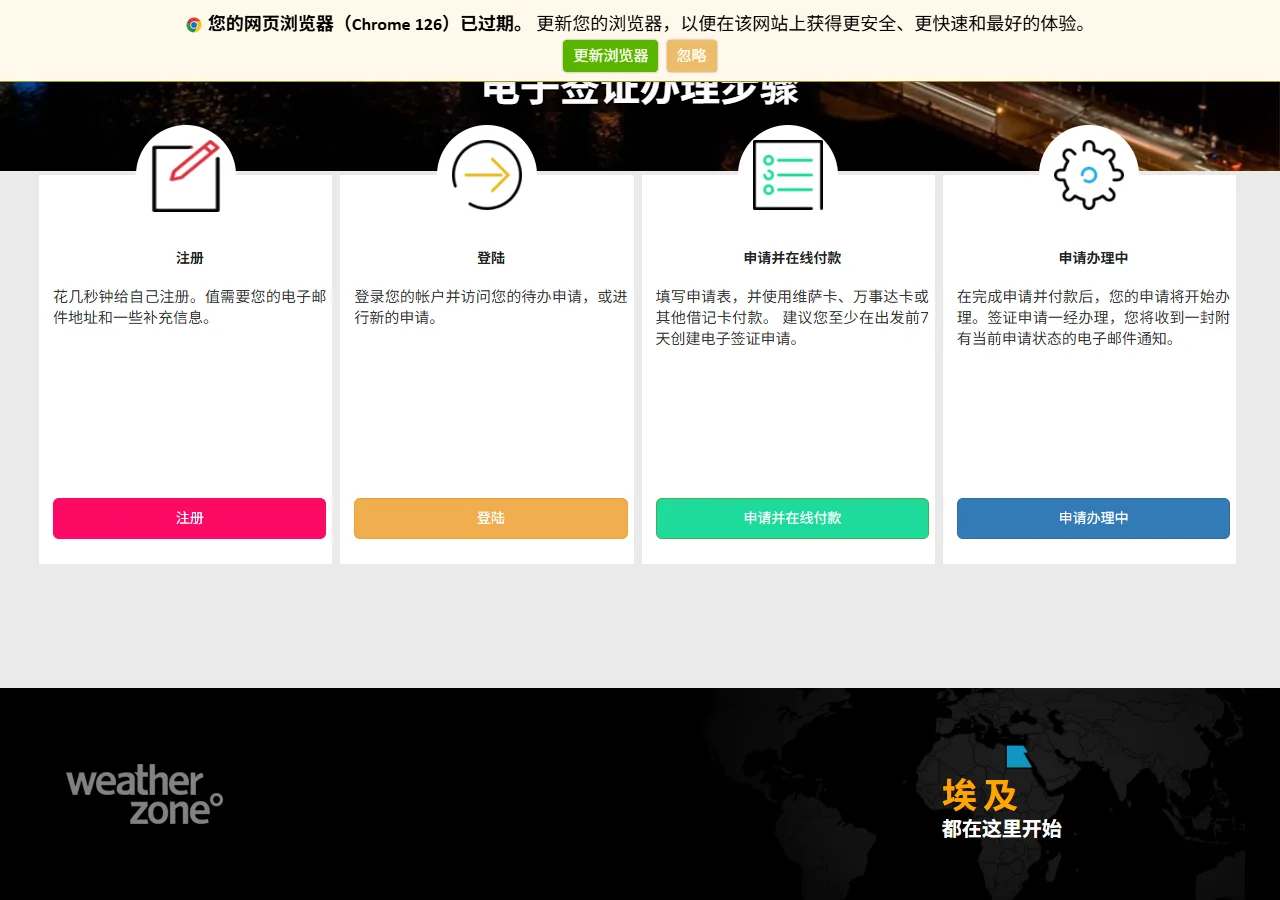
The official Egypt Electronic Visa Portal (visa2egypt.gov.eg). The site automatically redirects to the /eVisa/ path — that is normal, not phishing. The homepage summarises the 4 steps: Register (注册) → Sign in (登陆) → Apply and pay online (申请并在线付款) → track your application (申请办理中). Everything, including application, requires an account.

📸 About This Screenshot
This screenshot shows the latest official electronic entry card landing/login page. The step-by-step text guide below is based on the actual form structure, with detailed field instructions and common mistake warnings for your reference.
Get Your e-Visa Now
buttonRequired"Get your e-Visa now" (立即获得您的电子签证) leads to the sign-in page — you must register an account first. The whole process (apply, pay, track) runs inside your account.
⚠ Common Mistakes
- •Expecting to apply without creating an account — registration is mandatory
- •Being alarmed by the /eVisa/ URL redirect (it is normal)
2Portal Resources & Language
1fields
Portal Resources & Language
1fields
The lower part of the homepage links to useful pages: How to apply (如何申请), FAQ (常问问题), Terms of use and contact. The language selector (top) switches the site language. Read the how-to page before starting — it explains photo and passport-scan requirements that commonly cause rejections.
📸 About This Screenshot
This screenshot shows the latest official electronic entry card landing/login page. The step-by-step text guide below is based on the actual form structure, with detailed field instructions and common mistake warnings for your reference.
How to Apply Page
buttonOptionalOpen 如何申请 (How to apply) and read the requirements, especially the passport photo rules: white background, recent, no glasses — dimensions differ from US visa photos. Non-compliant photos and blurry passport scans are the top rejection reasons.
⚠ Common Mistakes
- •Uploading a US-spec visa photo (Egypt requires its own dimensions)
- •A passport scan with cut-off edges or glare
3Register Your Account
2fields
Register Your Account
2fields
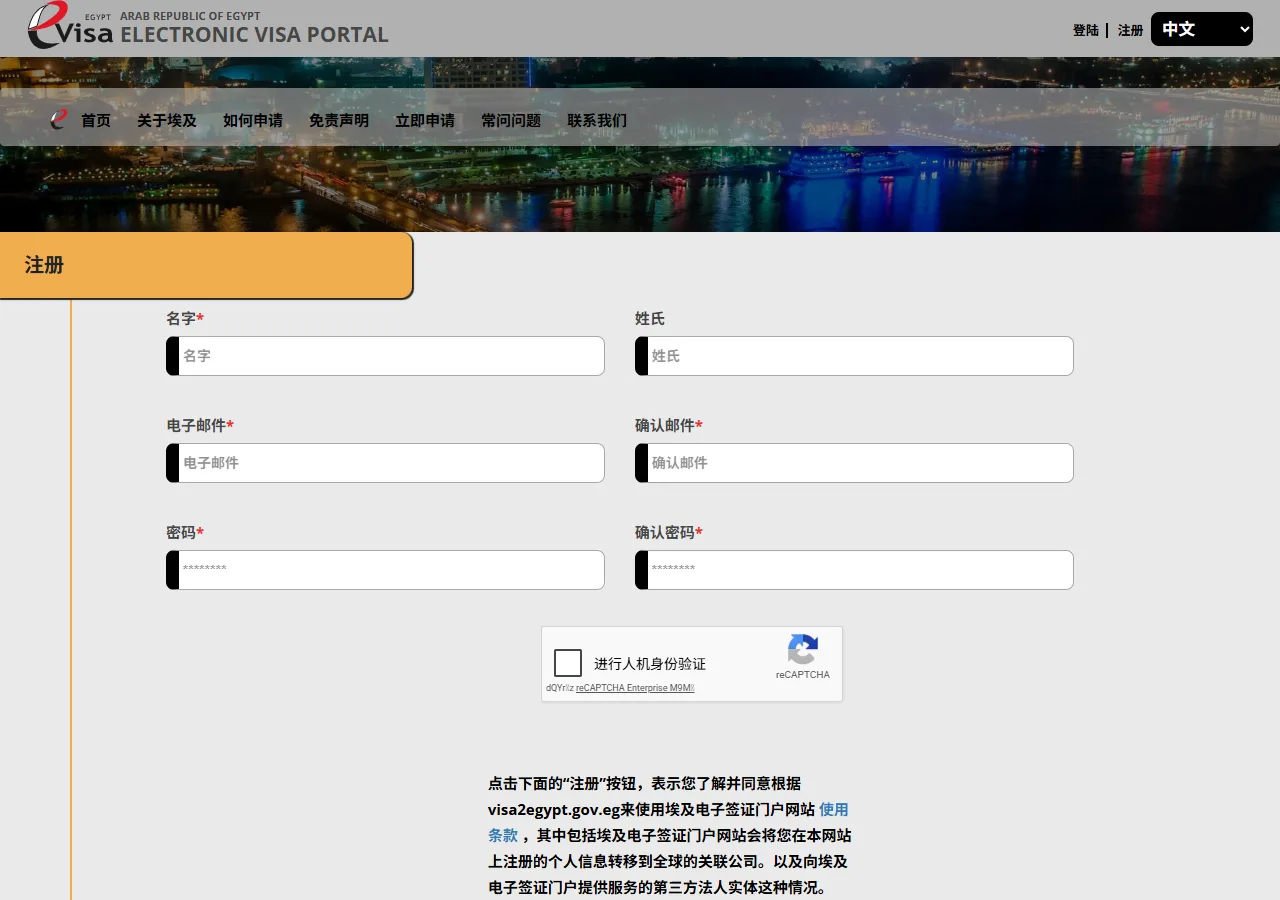
The sign-up page (注册) asks for your first name, surname, email, email confirmation, password and password confirmation. Use an inbox you can access — application updates and the approval letter are emailed to it. Keep the password safe: you will use this account to pay, download the approval letter and track your application.
📸 About This Screenshot
This screenshot shows the latest official electronic entry card landing/login page. The step-by-step text guide below is based on the actual form structure, with detailed field instructions and common mistake warnings for your reference.
First Name / Surname
textRequiredEnter exactly as in your passport. First name is required; surname is shown as optional in the form but fill it to match your passport.
⚠ Common Mistakes
- •Leaving the surname empty because it looked optional
Email & Password
emailRequiredEnter your email twice and a strong password twice. The email receives your application number and the approval letter — a typo here means you lose your application.
⚠ Common Mistakes
- •Typo in the email address — application updates never arrive
- •Forgetting the password — needed for every login during the application
4Choose Visa Type & Travel Details
2fields
Choose Visa Type & Travel Details
2fields
After signing in, start the application: choose single entry (USD 25) or multiple entry (USD 60), plus processing fees, paid online. Then enter your planned arrival date and the port of entry (Cairo, Hurghada, Sharm El-Sheikh, etc.) — it must match your actual point of entry. Apply at least 1-2 weeks ahead: processing usually takes 3-7 working days.
Visa Type
selectRequiredSingle entry = USD 25; multiple entry = USD 60 (plus processing fee). Choose multiple entry only if you will actually leave and re-enter Egypt more than once.
⚠ Common Mistakes
- •Paying for multiple entry when a single entry is enough
Arrival Date & Port of Entry
dateRequiredEnter the planned arrival date consistent with your ticket, and the actual port of entry (Cairo, Hurghada, Sharm El-Sheikh…). A mismatch with your real port of entry can cause problems at the border.
⚠ Common Mistakes
- •Selecting a port of entry that differs from the actual arrival airport
5Passport Details & Photo
2fields
Passport Details & Photo
2fields
Upload a clear, complete scan of your passport bio page (valid at least 6 months) and a recent white-background photo without glasses, meeting Egypt's own dimensions (not the US format). This is the stage where most applications are returned — check every upload before submitting.
Passport Bio Page Scan
uploadRequiredFull page, all four corners visible, no glare or cut-off edges. Passport must be valid at least 6 months from your arrival date.
⚠ Common Mistakes
- •Blurry scan or glare on the bio page
- •Cut-off edges of the passport page
Passport Photo
uploadRequiredRecent photo, white background, no glasses, facing the camera. Egypt's photo dimensions differ from US visa photos — check the size requirements on the how-to page.
⚠ Common Mistakes
- •Using a US-format visa photo
- •Wearing glasses or using an old photo
6Pay, Wait & Print the Approval Letter
2fields
Pay, Wait & Print the Approval Letter
2fields
Pay the fee online, then wait: processing usually takes 3-7 working days. When approved, download the approval letter and PRINT A PAPER COPY — at the border you must show it together with your passport; a phone screenshot alone may not be accepted. The e-Visa is valid 90 days from issuance for entry, with stays of up to 30 days.
Application Status Tracking
buttonOptionalSign in to track status (申请办理中). Check regularly during the 3-7 working days; if documents are returned for correction, fix them promptly and resubmit.
⚠ Common Mistakes
- •Applying too late and having no buffer for the 3-7 day processing time
- •Not noticing a document-rejection notice in the account
Print the Approval Letter
buttonRequiredPrint a paper copy of the approval letter and carry it with your passport. A phone screenshot alone may not be accepted at the border.
⚠ Common Mistakes
- •Showing only a phone screenshot at the border
- •Losing the approval letter after arrival
💬 Travel Experience Exchange
Applying or already traveled? Share your entry/exit experience, real problems encountered, or recent changes to help fellow travelers — our editors will also respond regularly.
- Share pitfalls or surprises during your entry process
- Let others know about recent entry procedure changes
- Read the guide and warnings above before asking
- Comments are moderated by the editorial team; inappropriate content is removed
💬 Leave a comment
Just enter your name and comment.