Turkey e-Visa
e-Visa / ETA Middle East | Türkiye e-Visa
August 7, 2026
✈️ Before You Go
For most passport holders from the EU, the US, the UK, and dozens of other nations, Turkey’s e-Visa is a mandatory entry document—not an option. The application looks like a 5-minute form, but in practice, expect 15 to 20 minutes including payment and email verification. But a detail that trips up newcomers: The system is strict: one typo in your passport number or a wrong date of birth means instant rejection, and you’ll have to reapply and pay again. Also, many travelers assume the e-Visa is valid for multiple entries—it’s single-entry for most nationalities, so a quick hop to Greece and back will cost you a second visa. Travelers often find that apply at least 72 hours before departure, but don’t pay for the “fast processing” add-on—it’s a scam; approvals are typically emailed within 1 to 2 hours, even on weekends. Print two copies: one for the airline check-in, one for Turkish border control, though digital copies on your phone are accepted at the gate—but not at the land border crossings, where they insist on paper.
⚠️ Important Notes
Application Window
Apply at least 48 hours in advance. Most applications approved within minutes. Valid for 180 days.
Cost
Fee varies by nationality (approx. USD 20-70), paid online by credit card
Fees are subject to change — always confirm on the official site.
- • Only use the official evisa.gov.tr — avoid third-party sites charging 3x or more of the official fee
- • e-Visa is valid for 180 days from approval. Some nationalities get multiple entries with up to 90 days per stay
- • Passport must be valid for at least 6 months from arrival
- • Print or screenshot the approval email — present it at immigration upon arrival
- • First confirm your nationality is on the e-Visa eligibility list — fees vary by nationality (approx. USD 20-70). Some nationalities require a sticker visa instead
- • The Turkish e-Visa website defaults to Turkish (lang='tr') — switch to English using the language toggle in the top-right corner
- • Date of birth format is DD/MM/YYYY (day/month/year), not the US format — entering the wrong format will invalidate your visa
- • Passport number: pay careful attention to letter O vs number 0 — the Turkish system is particularly sensitive to this
- • Some nationalities (e.g., Chinese passport holders with valid Schengen/US/UK visas) can use a simplified e-Visa application process
- • e-Visa is only for tourism and business purposes — work, study, or residence requires a visa from the Turkish embassy/consulate
- • Opening evisa.gov.tr first redirects to dtvgroup.com.tr — this is the official operator page authorized by the Ministry of Foreign Affairs (DTV Consultancy), not a phishing site. Continue with confidence
- • From 2026, Turkey requires arriving travelers to hold valid travel insurance covering the stay — prepare your insurance certificate before departure
📋 Application Field Guide
| Field Name | Tips & Notes |
|---|---|
Nationality Nationality | Select the nationality from your passport — fees and entry conditions vary by country. |
Passport Number Passport Number | Must match the passport exactly. Mind 0 vs O. |
Date of Birth Date of Birth | As on the passport, in DD/MM/YYYY format. |
Arrival Date Date of Arrival | Your planned entry date — the visa must be used within 180 days of approval. |
Step-by-Step Application Guide
💡 Before You Start
Before you start, prepare your passport (valid at least 6 months beyond your entry date), an email inbox you can access, and a payment card or Alipay. Confirm your nationality is eligible for the e-Visa — fees vary by nationality (roughly 20-70 USD) and some nationalities need a sticker visa. Citizens of some countries (e.g. China) holding a valid Schengen, US or UK visa get a simplified process. The e-Visa is for tourism and business only — work, study and residence require a consular visa. From 2026, valid travel insurance covering your stay is mandatory for entry.
1Official Entry Point (DTV Consulting)
1fields
Official Entry Point (DTV Consulting)
1fields
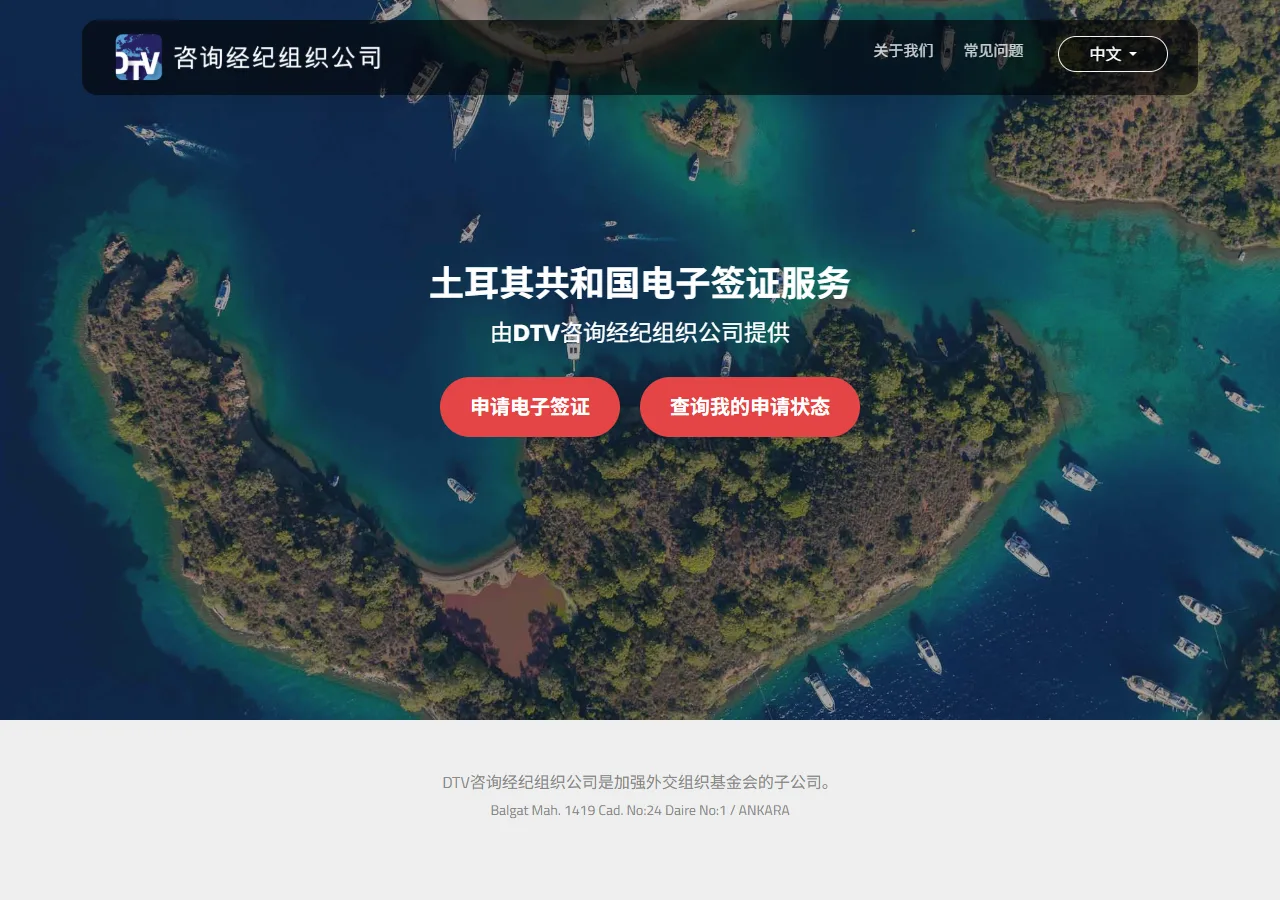
When you open evisa.gov.tr, you first land on dtvgroup.com.tr — the e-Visa service run by DTV Consulting, the operator authorized by the Turkish Ministry of Foreign Affairs. This redirect is official, not a scam. Click "Apply for e-Visa" (申请电子签证) to reach the government portal.
📸 About This Screenshot
This screenshot shows the latest official electronic entry card landing/login page. The step-by-step text guide below is based on the actual form structure, with detailed field instructions and common mistake warnings for your reference.
Apply for e-Visa Button
buttonRequiredClick "Apply for e-Visa" to start a new application. "Check My Application Status" is for tracking an application you already submitted. The page supports Chinese and other languages — switch at the top right if needed.
⚠ Common Mistakes
- •Panicking at the dtvgroup.com.tr domain and abandoning the official site — the redirect is officially authorized
- •Clicking "Check My Application Status" when you have not applied yet
2The Official e-Visa Portal
1fields
The Official e-Visa Portal
1fields
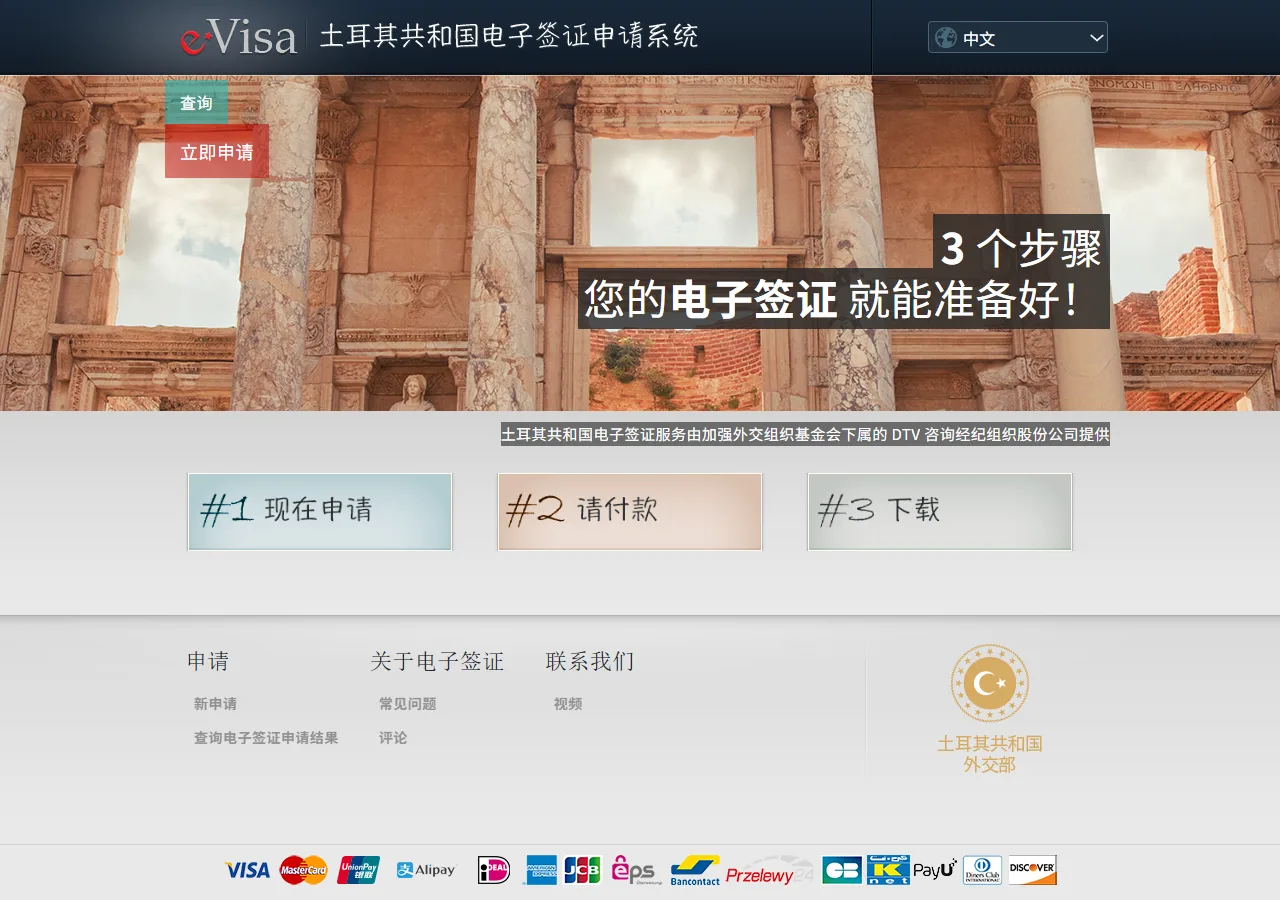
You are now on evisa.gov.tr, the government portal. It summarises the three steps of the process: apply (申请), pay (付款), download (下载). Click "Apply Now" (立即申请) to open the application form. The portal also lets you check an existing application and switch languages.
📸 About This Screenshot
This screenshot shows the latest official electronic entry card landing/login page. The step-by-step text guide below is based on the actual form structure, with detailed field instructions and common mistake warnings for your reference.
Apply Now Button
buttonRequiredClick "Apply Now" to open the application form. The portal's three illustrated steps (apply → pay → download) show the whole process: approval is normally instant, and you download the e-Visa as a PDF.
⚠ Common Mistakes
- •Expecting a long review process — Turkish e-Visas are usually approved within minutes
- •Using the search-engine ad link instead of the official portal — extra fees and no support
3Application Form: Nationality & Security Code
2fields
Application Form: Nationality & Security Code
2fields
The application form opens on evisa.gov.tr/zh/apply/. First select your nationality (and passport type, if asked), then enter the security code shown in the image. Click "Save and Continue" (保存并继续). The system checks your eligibility against your nationality right here.

📸 About This Screenshot
This screenshot shows the latest official electronic entry card landing/login page. The step-by-step text guide below is based on the actual form structure, with detailed field instructions and common mistake warnings for your reference.
Nationality
selectRequiredSelect the nationality of the passport you travel with. The fee and validity rules depend on this choice — fees range roughly from 20 to 70 USD depending on nationality, and some nationalities are not eligible for the e-Visa at all (they need a sticker visa).
⚠ Common Mistakes
- •Selecting your residence country instead of your passport nationality
- •Not checking eligibility first — some nationalities cannot use the e-Visa
Security Code (Captcha)
textRequiredType the characters shown in the image. If they are hard to read, click the image to get a new one. Refresh the code if you wait too long.
⚠ Common Mistakes
- •Misreading the captcha (similar letters/numbers) and getting locked out after repeated failures
4Fees & Payment Methods
1fields
Fees & Payment Methods
1fields
The bottom of the application page (and the footer across the site) shows the accepted payment methods: Visa, Mastercard, UnionPay and Alipay. The fee is set by your nationality — roughly 20 to 70 USD — and is paid online at the end of the application.

📸 About This Screenshot
This screenshot shows the latest official electronic entry card landing/login page. The step-by-step text guide below is based on the actual form structure, with detailed field instructions and common mistake warnings for your reference.
Save and Continue Button
buttonRequiredAfter the nationality and security code, click "Save and Continue" (保存并继续) to move to the date and personal-details pages. Your application session is saved as you go.
⚠ Common Mistakes
- •Expecting a payment screen immediately — payment comes at the very end of the flow
5Dates & Personal Details
3fields
Dates & Personal Details
3fields
The following pages collect your intended arrival date and personal details. Dates use DD/MM/YYYY — day first, unlike the US format; a wrong date can invalidate your e-Visa. Enter your passport number, name and birth date exactly as printed in your passport. Your passport must be valid for at least 6 months from your entry date.
Arrival Date
dateRequiredYour first intended entry date. Turkey e-Visas are valid for 180 days from approval and generally allow stays of up to 90 days — enter the actual first arrival date, not a later one.
⚠ Common Mistakes
- •Entering a date more than 180 days out — outside the e-Visa validity window
Passport Number & Name
textRequiredCopy exactly from the passport bio-data page. The Turkish system is particularly sensitive to the letter O vs the digit 0 in passport numbers.
⚠ Common Mistakes
- •Entering 0 as O or O as 0 in the passport number
- •Adding spaces or dashes that are not in the machine-readable zone
Date of Birth
dateRequiredDD/MM/YYYY — day first. Many travellers used to the US MM/DD/YYYY order enter it backwards; a wrong birth date can invalidate the e-Visa.
⚠ Common Mistakes
- •Swapping day and month (15/06 vs 06/15)
6Confirmation, Payment & Download
3fields
Confirmation, Payment & Download
3fields
The final pages confirm your details and collect payment by card (Visa, Mastercard, UnionPay) or Alipay. Approval is usually instant — the e-Visa appears on screen and is emailed to you as a PDF. Print it or save it on your phone to show at immigration, together with your passport. From 2026, valid travel insurance covering your stay is also mandatory for entry — prepare proof before travel.
Email Address
emailRequiredEnter an inbox you can access — the approved e-Visa PDF is sent here. Double-check the spelling before paying.
⚠ Common Mistakes
- •Typo in the email address — the e-Visa PDF goes astray
Payment
textRequiredPay online by card (Visa, Mastercard, UnionPay) or Alipay. The fee is set by your nationality — roughly 20 to 70 USD. Only the official site charges the official fee; agency sites charge several times more.
⚠ Common Mistakes
- •Paying on a look-alike agency site that charges 3x the official fee
- •Thinking the payment is a scam because the card page is hosted by a payment processor
Download the e-Visa
buttonRequiredSave the PDF and print a copy or keep it on your phone. Show it with your passport at the border. The approval email is your backup — keep it until you leave Turkey. E-Visa validity: 180 days from approval; stay limits (e.g. 90 days, single or multiple entry) depend on your nationality.
⚠ Common Mistakes
- •Not printing or saving the e-Visa — relying on memory or the email alone at the border
- •Confusing the 180-day validity window with the 90-day stay limit
💬 Travel Experience Exchange
Applying or already traveled? Share your entry/exit experience, real problems encountered, or recent changes to help fellow travelers — our editors will also respond regularly.
- Share pitfalls or surprises during your entry process
- Let others know about recent entry procedure changes
- Read the guide and warnings above before asking
- Comments are moderated by the editorial team; inappropriate content is removed
💬 Leave a comment
Just enter your name and comment.