Laos e-Visa
e-Visa / ETA Asia | Lao e-Visa
August 7, 2026
✈️ Before You Go
Before you book that Luang Prabang flight, check if your passport needs a Laos e-Visa—most nationalities do, though ASEAN neighbors and a few others skip it. The online form looks quick, but budget at least 3–5 business days for approval, not the 72 hours advertised; weekends and local holidays stall the queue. What surprises first-timers most: the e-Visa only works at specific entry points like Wattay Airport or the Friendship Bridge, so landing at a smaller border without prior arrangement means a last-minute visa-on-arrival scramble with cash only. From frequent visitors: upload a high-contrast passport scan, not a phone photo, or your application gets rejected for blur—then you lose the fee. Also, print two copies of the approval letter: one for immigration, one as a backup if the first gets crumpled. The process isn't hard, but it punishes carelessness.
⚠️ Important Notes
Application Window
Apply at least 1-2 weeks in advance. Standard processing 3 business days, express 1 business day.
Cost
e-Visa fee approx. USD 50 (standard), express approx. USD 60
Fees are subject to change — always confirm on the official site.
- • e-Visa is only valid at designated entry points (Vientiane Wattay Airport, Vientiane Friendship Bridge, Luang Prabang Airport, etc.) — other entry points will reject it
- • Passport must be valid for at least 6 months. Upload a clear passport bio page scan and a white-background ID photo
- • After approval, PRINT the A4 approval letter and present it with your passport — mobile screenshots alone may not be accepted
- • Only use the official laoevisa.gov.la — avoid expensive third-party agent sites
- • Standard processing takes 3 business days (approx. USD 50); express processing takes 1 business day (approx. USD 60) — choose the right type
- • The approval letter states a validity period — you must enter Laos within this window. Late entry voids the approval
- • ID photo must be 4x6cm, white background, without glasses — strict format requirements. Non-compliant photos cause rejection and delay
- • Once you select an entry checkpoint, it cannot be changed — entering through a different port will result in refusal and require a new application
- • Laos e-Visa is single-entry only — after leaving Laos, re-entry requires a new e-Visa or visa on arrival
- • The website is in English (lang='en') and runs on Angular — occasional slow loading is normal; wait for the page to fully render
📋 Application Field Guide
| Field Name | Tips & Notes |
|---|---|
Passport Number Passport Number | Enter exactly as on the passport. Mind 0/O and 1/I. |
Port of Entry Port of Entry | Select your actual port of arrival — e-Visa only works at listed entry points. |
Date of Arrival Date of Arrival | Enter your planned arrival date — the approval is valid only within its window. |
Passport Photo Upload Photo Upload | Upload a compliant white-background photo or the application will be rejected. |
Step-by-Step Application Guide
💡 Before You Start
What you'll need before opening the form: your passport, with at least 6 months of validity, a recent passport-style photo (white background), and a scanned copy of your passport's biographical page. Have a valid email address and a credit/debit card ready for payment. Plan your travel dates carefully, as the e-Visa is only valid at designated ports of entry.
1Account Creation
3fields
Account Creation
3fields
Create an account on the official Lao e-Visa website to start your application.
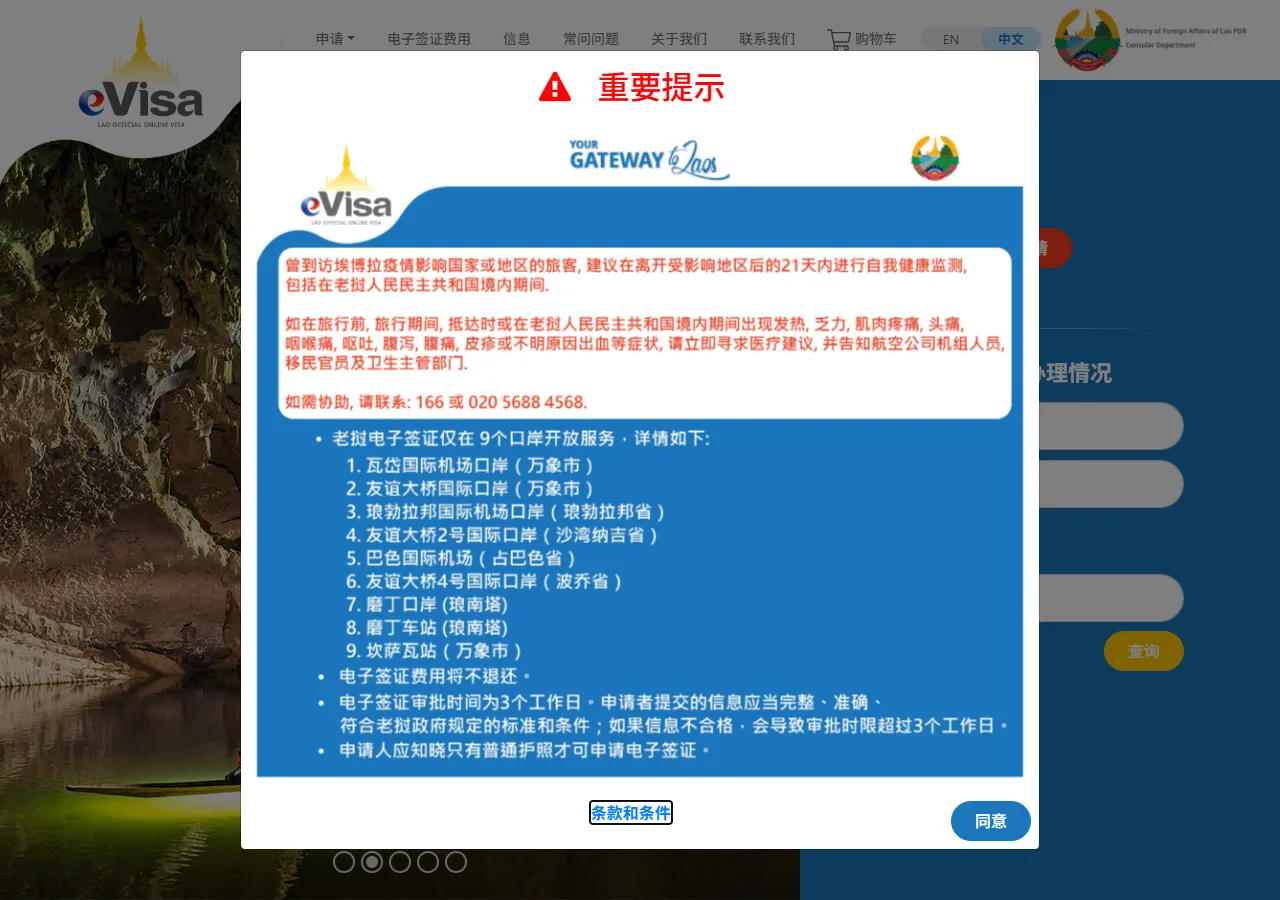
📸 About This Screenshot
This screenshot shows the latest official electronic entry card landing/login page. The step-by-step text guide below is based on the actual form structure, with detailed field instructions and common mistake warnings for your reference.
Email Address
emailRequiredEnter a valid email address that you check regularly. This will be used for all correspondence and to receive your e-Visa approval letter. Use the same email for the entire application process.
⚠ Common Mistakes
- •Using a rarely checked email address, causing missed updates
- •Typing the email incorrectly, leading to failed delivery of the approval letter
Password
passwordRequiredCreate a strong password with at least 8 characters, including uppercase, lowercase, numbers, and special characters. Keep it secure and remember it for future logins to check your application status.
⚠ Common Mistakes
- •Using a weak password that is easy to guess
- •Forgetting the password and being unable to log in later
Confirm Password
passwordRequiredRe-enter the exact same password you entered above. Double-check for any typos or extra spaces. The system will reject the registration if the passwords do not match.
⚠ Common Mistakes
- •Mismatched passwords due to typos
- •Including invisible spaces that cause mismatch
2Personal Information
4fields
Personal Information
4fields
Your basic identity fields begin here. Open your passport to the bio-data page and transcribe every detail exactly, including hyphens and special characters.
Full Name (as in passport)
textRequiredEnter your full name exactly as it appears on your passport, including the order of given name and surname. Do not use nicknames or abbreviations. Match the spelling character for character, including any special characters.
⚠ Common Mistakes
- •Reversing given name and surname order
- •Using a nickname or shortened name instead of the passport name
Date of Birth
dateRequiredSelect your date of birth in the format DD/MM/YYYY. Ensure it matches your passport exactly. Use the calendar picker if available to avoid format errors.
⚠ Common Mistakes
- •Entering the date in the wrong format (e.g., MM/DD/YYYY)
- •Selecting the wrong year due to a typo
Nationality
selectRequiredSelect your nationality from the dropdown list. This should match the country that issued your passport. If you hold multiple passports, use the one you will travel with.
⚠ Common Mistakes
- •Selecting the wrong country due to similar names
- •Choosing a nationality that does not match the passport used
Passport Number
textRequiredEnter your passport number exactly as printed on the passport's biographical page. Include all letters and digits, but do not include spaces or hyphens. Pay attention to characters like '0' (zero) vs 'O' (letter O) and '1' (one) vs 'I' (letter I).
⚠ Common Mistakes
- •Confusing '0' with 'O' or '1' with 'I'
- •Including spaces or hyphens that are not part of the number
3Travel Details
2fields
Travel Details
2fields
Specify your intended port of entry and arrival date in Laos.
Port of Entry
selectRequiredSelect the port of entry you will use from the list. The e-Visa is only valid at designated ports: Wattay International Airport (Vientiane), Friendship Bridge (Vientiane), Luang Prabang International Airport, and other specified checkpoints. Choosing a non-designated port will make your visa invalid.
⚠ Common Mistakes
- •Selecting a land border crossing that is not approved for e-Visa
- •Choosing the wrong airport (e.g., Pakse instead of Luang Prabang)
Date of Arrival
dateRequiredEnter the date you plan to arrive in Laos. The e-Visa is typically valid for 60 days from the issue date, and you must enter within that period. Choose a date that is at least 3 business days after your application submission (or 1 business day for expedited processing).
⚠ Common Mistakes
- •Selecting a date before the visa processing time is complete
- •Choosing a date outside the 60-day validity window
4Document Upload
2fields
Document Upload
2fields
Upload the required passport photo and passport information page scan.
Passport Photo Upload
uploadRequiredUpload a recent passport-style photograph with a white background. The photo should be in JPEG or PNG format, with a file size between 10KB and 5MB. Ensure your face is clearly visible, with no shadows or reflections. The photo must be taken within the last 6 months.
⚠ Common Mistakes
- •Uploading a photo with a non-white background or shadows
- •File size exceeds the limit, causing upload failure
Passport Information Page Scan
uploadRequiredUpload a clear, color scan of the biographical page of your passport. The entire page must be visible, including all text and the photo. The file should be in JPEG, PNG, or PDF format, with a maximum size of 5MB. Ensure the passport has at least 6 months of validity remaining.
⚠ Common Mistakes
- •Uploading a blurry or partially cropped scan
- •Submitting a passport that expires within 6 months
5Declarations and Review
2fields
Declarations and Review
2fields
Review your information, make any necessary declarations, and confirm accuracy before submission.
Declaration of Accuracy
radioRequiredCheck the box or select 'Yes' to declare that all information provided is true and correct. Providing false information can lead to visa denial or entry refusal. Read the declaration carefully before agreeing.
⚠ Common Mistakes
- •Skipping the declaration, preventing submission
- •Agreeing without verifying the information is correct
Review All Entries
radioRequiredBefore final submission, review every field you have entered. Compare your passport number, name, and dates with your physical passport. Any discrepancy could cause delays or rejection. Use the 'Back' button to correct any errors.
⚠ Common Mistakes
- •Submitting without double-checking, leading to errors
- •Assuming auto-fill is correct without verification
6Payment and Submission
2fields
Payment and Submission
2fields
Pay the visa fee and submit your application for processing.
Visa Processing Type
radioRequiredChoose between Standard Processing (3 business days, approximately $50 USD) and Expedited Processing (1 business day, approximately $60 USD). Select based on your travel timeline. If your departure is within a week, expedited is safer.
⚠ Common Mistakes
- •Choosing standard processing when departure is too soon
- •Paying for expedited when standard would suffice, wasting money
Payment Information
textRequiredEnter your credit or debit card details for payment. The official website accepts major cards. Ensure you are on the official site (laoevisa.gov.la) and look for the secure payment gateway (HTTPS). Do not share your card details on any other website.
⚠ Common Mistakes
- •Entering card details on a fraudulent third-party website
- •Typing the card number incorrectly, causing payment failure
💬 Travel Experience Exchange
Applying or already traveled? Share your entry/exit experience, real problems encountered, or recent changes to help fellow travelers — our editors will also respond regularly.
- Share pitfalls or surprises during your entry process
- Let others know about recent entry procedure changes
- Read the guide and warnings above before asking
- Comments are moderated by the editorial team; inappropriate content is removed
💬 Leave a comment
Just enter your name and comment.